Participating Frequently
October 1, 2018
Answered

Probleem adobe creative cloud

  • October 1, 2018
  • 2 replies
  • 581 views

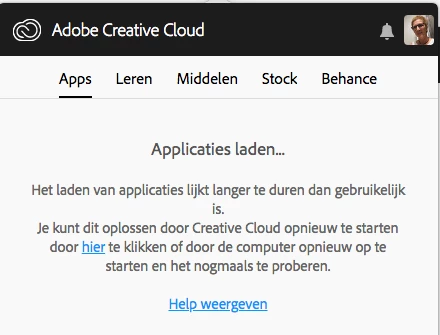
ik krijg steeds de melding ... zie bijlage ook al start ik de pc opnieuw

wat kan de oorzaak zijn ?

This topic has been closed for replies.
Correct answer AxelMatt

ik heb de firewall uitgeschakeld en de pc opnieuw opgestart en nog lukt het niet en heb de firewall nu terug ingeschakeld


Please take a look here:

Adobe Creative Cloud desktop app doesn't open or shows a spinning progress wheel

2 replies

Abambo
Community Expert
Community Expert
October 1, 2018

This is a network problem. at my site it was an erroneous proxy configuration.

ABAMBO | Hard- and Software Engineer | Photographer
Participating Frequently
October 1, 2018

ok , maar hoe los ik het op ?

Abambo
Community Expert
Community Expert
October 1, 2018

Look at your firewall and proxy settings. If you are behind a corporate firewall/proxy, ask your it support to take care of the problem. If you are in a home environment or standard small office environment, disable temporary your firewall, virus check or any other security software installed on your system. Be careful as you will disable your protection, so do not forget to enable that again after your test.

ABAMBO | Hard- and Software Engineer | Photographer
Participating Frequently
October 1, 2018

ik heb ook al afgemeld en terug aangemeld maar dat help ook niet