benjaminm37523196
Participant
May 29, 2017
Answered

Problem downloading CS5 onto MacBook Pro

  • May 29, 2017
  • 2 replies
  • 338 views

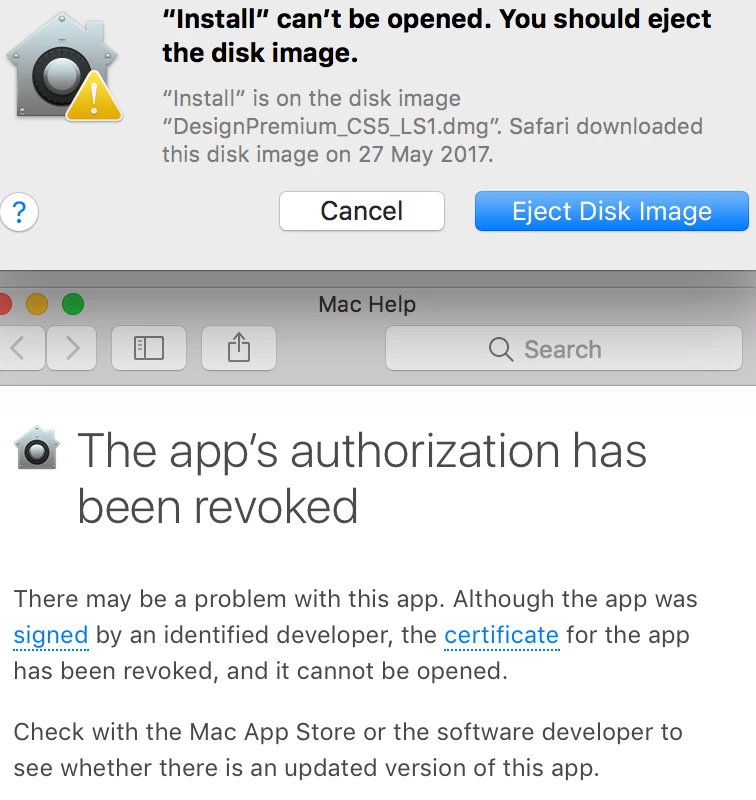
I am trying to download a copy of CS5 onto a new MacBook Pro.  I already have a registered copy on my iMac and need to put it on the mac book.  We do not have a CD drive so am doing the digital download.  It downloaded, but when I try to launch it comes up with this message.  I am on Sierra 10.12.5  and have done the troubleshooting section advised by adobe but this hasn't worked.  I have also contacted my Apple reseller and they have told me it should work and suggested I contact Adobe.  Please Help!!  I'm at a stand still at the moment!  Thanks.
    This topic has been closed for replies.
    Correct answer John T Smith

    CS6 and earlier programs have not been tested and will not be updated for Mac El Capitan/Sierra

    -which means that you try to use CS6 and earlier at YOUR risk of having problems due to Apple updates

    -Apple did not maintain backward compatibility with old programs in El Capitan or Sierra

    --Adobe has a workaround to Apple's problem of not maintaining backward compatibility

    --several help links and Adobe solution to Apple's problem inside this message https://forums.adobe.com/thread/2301916

    2 replies

    John Waller
    Community Expert
    Community Expert
    May 30, 2017
    John T Smith
    Community Expert
    John T SmithCommunity ExpertCorrect answer
    Community Expert
    May 30, 2017

    CS6 and earlier programs have not been tested and will not be updated for Mac El Capitan/Sierra

    -which means that you try to use CS6 and earlier at YOUR risk of having problems due to Apple updates

    -Apple did not maintain backward compatibility with old programs in El Capitan or Sierra

    --Adobe has a workaround to Apple's problem of not maintaining backward compatibility

    --several help links and Adobe solution to Apple's problem inside this message https://forums.adobe.com/thread/2301916