dionj80782623
Participant
February 7, 2018
Answered

Problem installing Lightroom 6: another instance of the installer is already running

  • February 7, 2018
  • 1 reply
  • 1215 views

Hi,

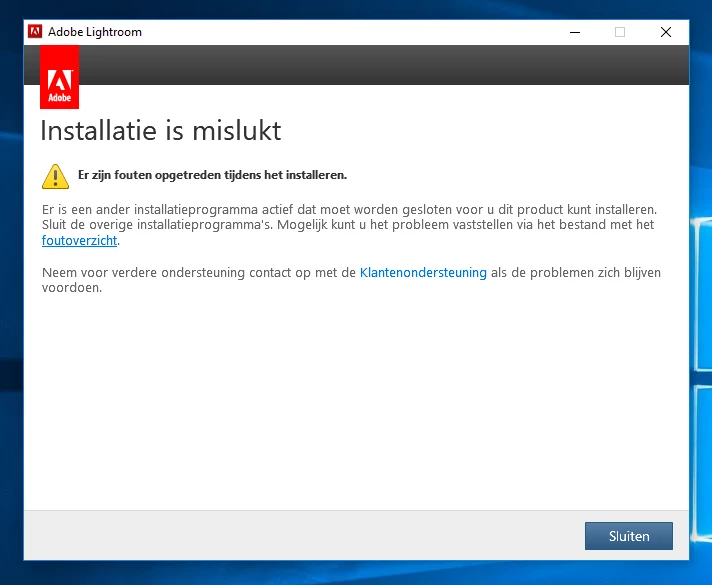
When I first tried to install lightroom 6.0 I got an error message after the "preparing for install" loading screen, right after inserting the license key.

The message was (translated from Dutch):

"Installation failure. Errors came up during installation. Another installation program is active and needs to be cloes before you can install this product."

Now I get almost the same error message immediately after starting the installation, even after rebooting.

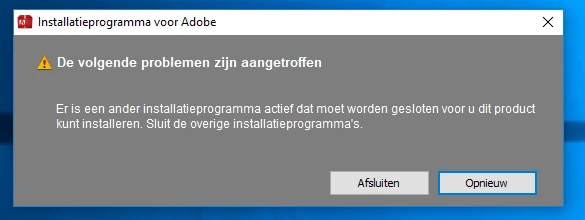
The message now reads (translated from Dutch):

"The Adobe installation program is already active. Close the other Adobe-installation programs and choose Retry if you want to proceed"

Some info:

  • I've rebooted several times
  • I've stopped the Windows Installer instance
  • I'm sure there isn't another installation active in the Task Control screen
  • I'm on Windows 10, 64 bit

Please help,

Thanks, Dion
This topic has been closed for replies.
Correct answer dionj80782623

Hi Bani, thanks for the advice.

I've got it working now, but it took some more effort.

I had te problem of not being able to run the install program due to the "another installation program is active" error.

What I did:

  • Restart into safe mode - This seems to resolve the error, installation continues. But at the end of installation a message pop-up told me it installed partially, the added error-log was empty

Then I started Lightroom 6 but immediately got a message that mfc110u.dll was missing.

What I did:

  • Uninstall all the Visual C++ redistributables and reinstall just VCredist_x64 downloaded from the Microsoft site - Now I could start Lightroom 6.

However, Lightroom 6 froze as soon as the starting splash screen came up. No buttons to press, waited for 20 minutes before force quitting the program.

What I did:

  • Go to the Adobe website and download the Lightroom 6 1.14 update and install.

No problems anymore, Lightroom starts and works fine now.

I don't understand the hassle this took to fix. Adobe should take care of this. All the above information came from help from this forum and posts more than 3 years old! My laptop has a fresh and clean install (is only 1 month old with no prior Adobe installs to replace).

But I'm a happy camper now.

Cheers,

Dion

1 reply

Bani Verma
Community Manager
Community Manager
February 7, 2018

Hi Dionj80782623,

As you have mentioned you are unable to install Lightroom 6 on your computer because it fails with an error message saying that there is another installer running, and you have already performed all the basic troubleshooting steps to resolve this however the error persists.

I would suggest you to try the installation in a new admin user account and see if that helps. See: Adobe troubleshooting: Creating an admin account in Windows.

Let us know if this helps.

dionj80782623
dionj80782623AuthorCorrect answer
Participant
February 8, 2018

Hi Bani, thanks for the advice.

I've got it working now, but it took some more effort.

I had te problem of not being able to run the install program due to the "another installation program is active" error.

What I did:

  • Restart into safe mode - This seems to resolve the error, installation continues. But at the end of installation a message pop-up told me it installed partially, the added error-log was empty

Then I started Lightroom 6 but immediately got a message that mfc110u.dll was missing.

What I did:

  • Uninstall all the Visual C++ redistributables and reinstall just VCredist_x64 downloaded from the Microsoft site - Now I could start Lightroom 6.

However, Lightroom 6 froze as soon as the starting splash screen came up. No buttons to press, waited for 20 minutes before force quitting the program.

What I did:

  • Go to the Adobe website and download the Lightroom 6 1.14 update and install.

No problems anymore, Lightroom starts and works fine now.

I don't understand the hassle this took to fix. Adobe should take care of this. All the above information came from help from this forum and posts more than 3 years old! My laptop has a fresh and clean install (is only 1 month old with no prior Adobe installs to replace).

But I'm a happy camper now.

Cheers,

Dion

Bani Verma
Community Manager
Community Manager
February 8, 2018

Glad to know everything is up and running now, and thank you! for sharing the steps that helped resolve the issue for you as this will help our other viewers as well, and sorry for the inconvenience it has caused to you.