
joanavpar
Participant
May 1, 2015
Question

Problem when reinstalling Acrobat XI Pro

  • May 1, 2015
  • 2 replies
  • 702 views

I had an official Acrobat XI Pro installed in a previous computer with Win 8.1 and I have changed the computer for a brand new with Win 8.1 as well. After doing the installation again  the system requests to update the license number although it detects that the one I've introduced at the beggining is valid. However, in the screen where it requests to write the license number, there is no an option for Acrobat XI Pro. I don't know how to finish the installation.
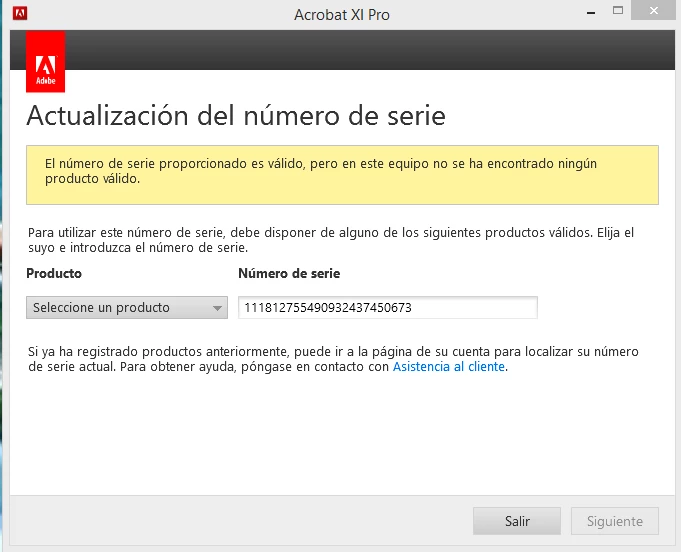
In the grey tab to select the producto, Acrobat XI Pro doesn't appear. How can I continue?

Thanks a lot for your support

Joan

This topic has been closed for replies.

2 replies

Participating Frequently
May 5, 2015

I think your product is an upgrade wherein we need to enter serial number twice. One of the latest version that we have and the other, for an earlier version which will serve as a qualifying version. For checking the qualifying product, you can navigate to adobe.com/account.html and sign in. Under plans and products, click on View all my products. You will find all your registered products out there.

Still if you face any issues, please let me know.

Participating Frequently
May 1, 2015

Hello Can try to assist you in installing the product

Participating Frequently
May 1, 2015

Is the issue resolved or still prevailing?