
Participant
October 18, 2013
Answered

Problem with Creative Cloud Desktop app since update to Windows 8.1

  • October 18, 2013
  • 17 replies
  • 40838 views

Hi, I have updated my desktop and laptop to Windows 8.1 over the past day, and have noticed a problem with the Creative Cloud Desktop app.

Some menu items when I right-click on either the CC system tray icon, or click on the Settings menu icon in the app interface itself do not show.  I've included a screenshot of the problem.

I have tried uninstalling and reinstalling the desktop app, but this has not worked.  Any ideas?
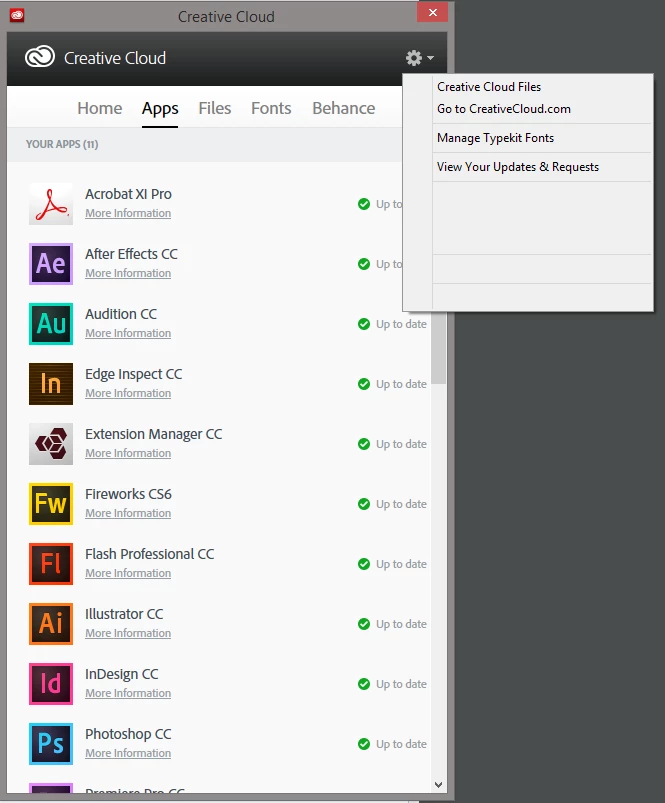
This topic has been closed for replies.
Correct answer Jeffrey_A_Wright

Interestingly I had a call yesterday from an Adobe support person about this - maybe phoning several people on the forum who have been raising this issue over the last few weeks. I was impressed that he did call - rather late though but appreciated all the same. If only they had publically said that they were looking into it earlier. No dates for a fix etc were needed - just that they were aware of the issue. I think that would have gone some way to controlling some of the anger expressed here and on Twitter.


If you update to the current version of the Creative Cloud desktop application it should allow you to resolve this difficulty.  For more information please see Creative Cloud desktop has missing text in Windows 8.1 - http://helpx.adobe.com/creative-cloud/kb/creative-cloud-desktop-missing-text.html.

17 replies

Adobe Employee
November 7, 2013

This is a bug with the latest update, and we will be releasing an update to fix it very soon.

Sorry about all of the hassle and trouble.

mike chambers

emsh@adobe.com

Participating Frequently
November 7, 2013

Seems this is fixed now.

I uninstalled the Creative Cloud desktop app.

Reinstall - if you have a new or old installer on hand, it does not seem to really matter because the latest gets downboaded anyway.

DONE. All my menus etc are back as they should be.

David__B
Adobe Employee
Adobe Employee
November 7, 2013

If you are still facing issues after installing the latest Creative Cloud app update please let us know. The latest version is 1.2.1.260. You can check the version from Account tab within the preferences (screen shot is a little dated).

(click to view larger)

Participant
November 5, 2013

Just adding my name to this list of frustrated customers also with the same issue. I reinstalled to fix the issue with the "floating icon window", however it still has the blank menu issue.

I am running a GeForce 9600GT with the Latest drivers.

On a side note to the OP "Lee_M", funnily enough my name is also Leigh M... lol

davidhofberg
Participant
October 31, 2013

The update did nothing for me either. It took some effort to install it and confirm it was the new version, but once there it behaves exactly like the old one.

Participant
October 30, 2013

Just like to report I am having the same issue with Windows 8.1 (to add to the pressure on Adobe to do something about this issue). Thankfully Photoshop seems unaffected.

OS: Windows 8.1

Video card: ATI Radeon HD 3870 (Microsoft Corporation - WDDM v1.1)

Driver Provider: Avanced Micro Devices, Inc.

Driver: 8.97.10.6

Driver Date: 20/06/2012

Participant
October 30, 2013

Same issue here. Gettin pretty old tbh.

Jonny Shaw
Known Participant
October 30, 2013

Ok this is getting silly now, paying nearly £50 a month - I don't expect to see this on launch.

Participant
October 28, 2013

I have the same problem here as well. Both video card and drivers were exactly the same and working perfectly under windows 7.

I completed a clean install of windows 8 and 8.1. Creative cloud app is completely unusable.

Participating Frequently
October 28, 2013

Try this, partially works for me, still can't see some menu's - but at least can install Programs. Cannot see menu to change install path though;

http://www.adobe.com/support/contact/cscleanertool.html

Check this thread also before using, i only used cleaner tool as i could not find Libraray/Application Support/Adobe/OOBE on Windows 8.1 yet

Let us know if full method works and has all menus?

Participant
October 26, 2013

Having this issue as well. I can't install Creative Cloud properly because of this.

Windows 8.1 Version 6.3.9600

Nvidia GTX590 - 331.58 Drivers

Adobe Employee
October 25, 2013

This may be happening on only some machines. Here's the screenshot from my Windows 8.1 machine. Looks good. We'll dig in more.

Participating Frequently
October 25, 2013

Same here.. and Photoshop CC isn't working on Windows 8.1. It hangs on the File -> Open dialog. Anyone at Adobe reading these threads?

Participating Frequently
October 25, 2013

Ps CC is working fine my side. It is possible you are having a specific issue with yours.

David__B
Adobe Employee
Adobe Employee
October 25, 2013

For those experiencing the issue with panels appearing blank or with missing text could you post the type of videocard you have and the driver version?

Does turning visual effects off (or set to Adjust for best performance) make any difference?