BD_57
Participant
November 18, 2018
Answered

Probleme mit patchinstaller

  • November 18, 2018
  • 2 replies
  • 655 views

Ich habe LR6 für windows heruntergeladen und will es mit der patchinstaller.exe starten. Dann bekomme ich dies Fehlermeldung
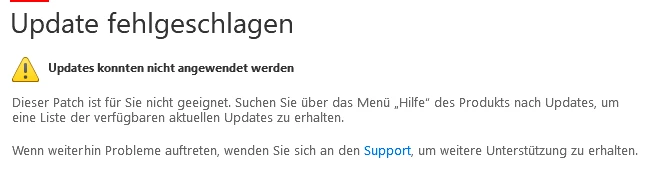
Ich finde kein Update dazu und kann mein Produkt folglich nicht installieren.

    This topic has been closed for replies.
    Correct answer kglad

    you're using the wrong update:  open lr>click help>update.

    if you're trying to install lr, use the below link that matches the version you own:

    note: newer os'es (especially mac os'es) are not compatible with older programs (especially adobe's).  this may help you start your installation, https://helpx.adobe.com/x-productkb/global/macos-high-sierra-compatibility.html that said, you can download the installation files using the below link.

    Single user licensee downloadable installation files available:


    Updates

    • Download and installation help for Adobe links

    • Download and installation help for Prodesigntools links are listed on most linked pages.  They are critical; especially steps 1, 2 and 3 which also apply to eLearning Sute 2.5.  If you click a link that does not have those steps listed, open a second window using the Lightroom 3 link to see those 'Important Instructions'.

    And a big thank you to Jim @ Prodesigntools for helping me with these links!

    [moved from Adobe Creative Cloud to Downloading, Installing, Setting Up]

    2 replies

    Abambo
    Community Expert
    Community Expert
    November 20, 2018

    Ist LR 6 bereits auf der MAschine installiert?

    ABAMBO | Hard- and Software Engineer | Photographer
    BD_57
    BD_57Author
    Participant
    November 20, 2018

    Nein, ich habe aber immerhin die richtige Software laden können, aber mein Prozessor erfüllt jetzt nicht die Anforderungen an das Programm.

    kglad
    Community Expert
    kgladCommunity ExpertCorrect answer
    Community Expert
    November 19, 2018

    you're using the wrong update:  open lr>click help>update.

    if you're trying to install lr, use the below link that matches the version you own:

    note: newer os'es (especially mac os'es) are not compatible with older programs (especially adobe's).  this may help you start your installation, https://helpx.adobe.com/x-productkb/global/macos-high-sierra-compatibility.html that said, you can download the installation files using the below link.

    Single user licensee downloadable installation files available:


    Updates

    • Download and installation help for Adobe links

    • Download and installation help for Prodesigntools links are listed on most linked pages.  They are critical; especially steps 1, 2 and 3 which also apply to eLearning Sute 2.5.  If you click a link that does not have those steps listed, open a second window using the Lightroom 3 link to see those 'Important Instructions'.

    And a big thank you to Jim @ Prodesigntools for helping me with these links!

    [moved from Adobe Creative Cloud to Downloading, Installing, Setting Up]