



HAW Andreas
Participant
May 4, 2026
Answered

Problems with registration after reinstalling Adobe CS6
  • May 4, 2026
  • 2 replies
  • 32 views
Adobe Error Message


Hello, I have a computer (Mac Mini running OS X El Capitan) with Adobe CS6 Master Collection installed.

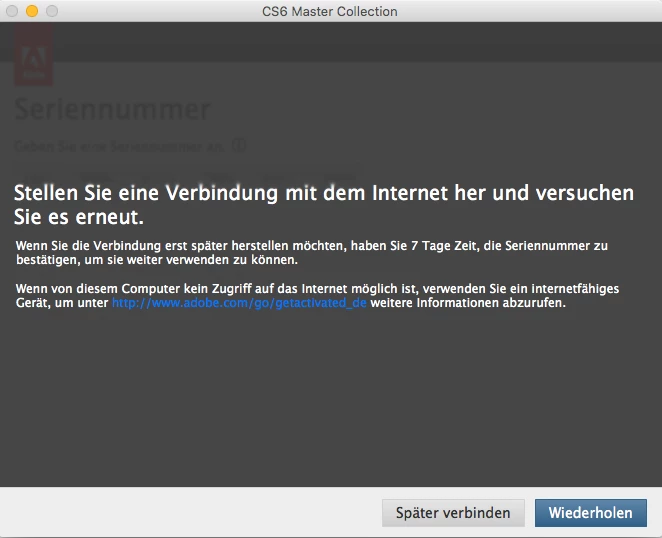
I had to reinstall the operating system and now want to reinstall the Master Collection. Unfortunately, the licensing process fails, and I get an error message saying there is no internet connection.


See screenshot.


I’ve already searched through all the help pages I could find and tried the following:
- The computer is connected to the internet
- Adobe licensing servers are reachable --> Pong
- Checked the hosts file

Unfortunately, none of this helped.

How can I solve this problem?

Thank you very much
Andreas

Correct answer kglad

use offline activation:


Launch the product.
At the Serial Number Validation screen, click Having Trouble Connecting To The Internet.
Click Offline Activation and click Generate a Response Code.
Write down the Request Code.
Switch to an online computer and navigate to www.adobe.com/go/getactivated.
Click Offline Activation.
Sign in with your Adobe ID.
Enter your Request code and click Generate.
Write down the Response code.
Switch back to the offline computer.
Enter the Response Code and click Activate.

https://helpx.adobe.com/creative-suite/kb/serial-number-validation-launching-cs6.html

2 replies

HAW Andreas
Participant
May 5, 2026

@kglad Thanks that was the solution!!

kglad
Community Expert
Community Expert
May 5, 2026

you’re welcome!

kglad
Community Expert
kgladCommunity ExpertCorrect answer
Community Expert
May 4, 2026

use offline activation:


Launch the product.
At the Serial Number Validation screen, click Having Trouble Connecting To The Internet.
Click Offline Activation and click Generate a Response Code.
Write down the Request Code.
Switch to an online computer and navigate to www.adobe.com/go/getactivated.
Click Offline Activation.
Sign in with your Adobe ID.
Enter your Request code and click Generate.
Write down the Response code.
Switch back to the offline computer.
Enter the Response Code and click Activate.

https://helpx.adobe.com/creative-suite/kb/serial-number-validation-launching-cs6.html