Participating Frequently
November 27, 2018
Answered

Product doesn't show in Adobe Creative Cloud

  • November 27, 2018
  • 1 reply
  • 1203 views

Hey there,

I'm  new to this forum, hope I'm in the right category.

So I've been abroad for a year. Before, I had the Creative Cloud, now I don't anymore and I don't intend on subscribing again in the near future. This is why I'd like to uninstall all Creative Cloud products. Now I've seen the pages on how to uninstall products normally, but they don't seem to work for me.

This is what I've tried. I went to the uninstall application of Windows (I'm on Windows 10 64 Bit). I can find my adobe applications there. Once I click uninstall on, let's say, Photoshop, the Creative Cloud Launcher opens up and asks me if I want to clear my Photoshop settings. I approve, and a process bar for uninstalling fills up to 100%. Sadly, the program is not actually uninstalled though. I can still find it on Windows' application list and it's still there in my Adobe folder.

The other method I found was to uninstall out of the CC Launcher itself. However, my products don't show under "My applications and services" (translated from German). So when I go to Photoshop CC (Photoshop CC 2017 which I'm still on is not on the list), and open the dropdown menu, I can only get more infos or the link to purchasing it.

I'd like not having to reset my whole computer. So if anyone has an idea on how to uninstall all my adobe products completely, please let me know.

Thanks in advance.

Best,

Karl
This topic has been closed for replies.
Correct answer Bani Verma

Hey Bani,

this guideline does not work for me anymore since I can't open up the Creative Cloud Launcher anymore after deleting all the files I could. However, I've tried the exact steps written there before reaching out for help. As mentioned above, the launcher did not display the products I wanted to uninstall back then. For example, instead of "Photoshop CC 2017", which I was still on, it just displayed "Photoshop CC". Using the dropdown menu, I could only get "more information" or head over to the purchasing page.

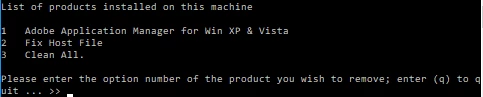
The Adobe Creative Cloud Cleaner Tool told me these were the only installed products on my machine.

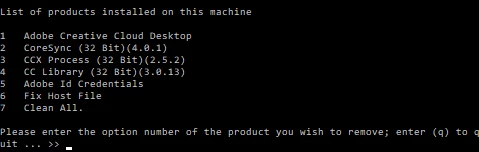
Cleaning them all was supposedly successful. However, after restarting the tool, this product seemed to still be installed:

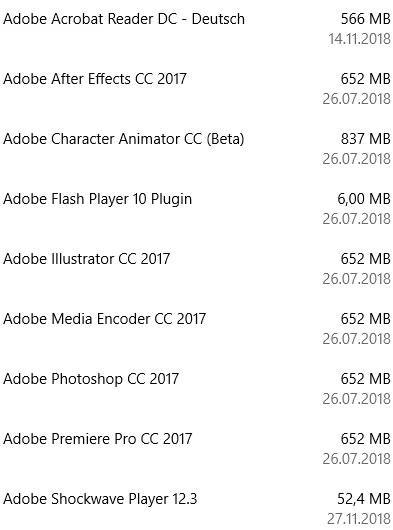
This is a screenshot of Windows' application manager. It still seems to think the Adobe products are installed.

Thank you for your help. I'm looking forward to your response.

Best,

Karl


Karl, if possible can you please install the CC desktop app again and then use it to uninstall these apps? This should help. Download Creative Cloud desktop app.

If it still doesn't work then can you please reach out to us via phone or chat here? Contact Customer Care.

Our product and tech experts will be able to help you out best! as they can hop on a remote session to troubleshoot this further.

Let us know if you have any questions. Thanks!

1 reply

Bani Verma
Legend
November 27, 2018

Hi Karl,

As you have mentioned you would like to remove all the Adobe apps from your machine and you have tried uninstalling them through the windows uninstall utility however it fails to remove the apps from your computer.

You may go ahead and manually remove everything related to Adobe from your machine by following the steps shared in this thread: Trouble Uninstalling - adobe cleaner doesn't work

NOTE: This will delete everything related to Adobe from your machine.

Let us know if this helps.

hukarlAuthor
Participating Frequently
November 28, 2018

Hey Bani,

thanks for your quick response. I guess you're referring to this list of steps:

Delete everything that says Adobe on it from the following folders:

  • Program Files > Adobe
  • Program Files > Common Files > Adobe
  • Program Files (x86) > Adobe
  • Program Files (x86) > Common Files > Adobe
  • C:\Users\<user_name>\AppData\Local\Adobe
  • C:\Program DATA \Adobe

Correct me if I'm wrong, but isn't this something else than uninstalling? Doesn't uninstalling an application delete files in places like the registry and what not that are not listed here? I wouldn't want to have some corrupt half-existing applications flying around on my machine.

Best,

Karl

Govardhan.V
Participating Frequently
November 28, 2018

Hi Karl,

Not all the files and folders will be removed during un-installation , some user profile and system related data will be left over which might be required in future if you plan to install the applications again. Also some of the files / Folders will remain as remnants due to system issue during uninstallation.

If you are having issues and wish to start over , you can follow the steps mentioned above which is the process of manual complete removal of the Adobe apps and apps related data. So that once you start with the fresh installation , it will create all those folders again.