


Participant
October 28, 2021
Answered

pse 2020 install failure: OS/browser no longer supported

  • October 28, 2021
  • 1 reply
  • 271 views

Hello, I'm trying to install pse 2020 on a Windows 10 PC and this message appears:
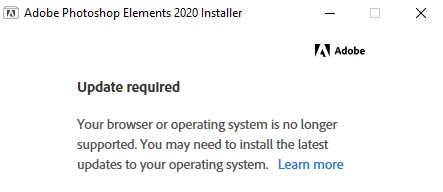
 

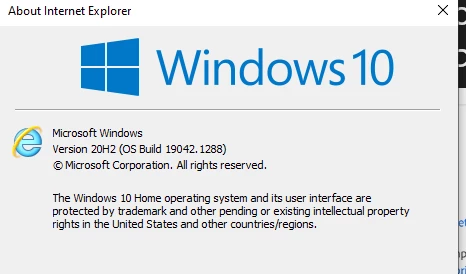
I found this on the Help site: Starting August 2020, only Internet Explorer version 11 and later are supported for signing in. Adobe software uses Internet Explorer during the sign-in process. I've applied all the latest Windows 10 updates which shows in Settings as Up to Date, here's the current info:


Not sure what else I can do re the OS/browser, so this is possibly a misleading message and there is another issue. I noticed a similar post for pse 2019 which required installation of pse 2015 before the 2019 installer would work, but I already have 2015 installed. Do I need to uninstall the 2015 version first (I'd assumed the 2020 install process would remove older versions if required when it actually gets going) or is there another issue? Any help appreciated, thanks


This topic has been closed for replies.
Correct answer Fizzles

Hi Jeff, many thanks for your reply. I was subsequently advised that the issue is the other way round - it's the software on the installation DVD that is looking for older components that have now been deprecated. I located the online download for the 2020 product and this worked fine (which, of course, I should have done in the first place)

1 reply

Jeffrey_A_Wright
Community Manager
Community Manager
October 28, 2021

Fizzies, please verify that Transport Layer Security 1.2 is enabled on the computer. For more information, see https://helpx.adobe.com/x-productkb/multi/eol-tls-support.html.


You may also want to determine why the installation of Windows 10 is stuck at version 20H2.  There may be many pending updates that have not been applied since 2021.  You can find additional details about Windows 10 versions at https://docs.microsoft.com/en-us/windows/release-health/release-information.

FizzlesAuthorCorrect answer
Participant
October 30, 2021

Hi Jeff, many thanks for your reply. I was subsequently advised that the issue is the other way round - it's the software on the installation DVD that is looking for older components that have now been deprecated. I located the online download for the 2020 product and this worked fine (which, of course, I should have done in the first place)