jimbraden
Participant
May 10, 2019
Answered

Raw and jpeg

  • May 10, 2019
  • 2 replies
  • 2835 views

New to Lightroom CC...Importated all photos to Lightroom ...I have a mixture of JPEG and Raw photos.  When I get ready to move photos after I have done some corrections I check them  and they show up as jpeg... Get a new photo that I know was taken in Raw format  Right click on it  box comes up  that says inhance photo  click on that and it says cannot do this because it is jpeg....  I know program cannot convert your files... Need help. Thanks in advance
This topic has been closed for replies.
Correct answer 99jon

That’s one place JPEG shows up...I am useing a Nikon D750...Now when I want to import a picture  go to right corner of Lightroom click on small box with arrow  says save to/ save to web...Tap  save to goes to black box...

File type ...JPEG

location..........


size.........

This picture was shot in RAW


Hi Jim, if you are using Lightroom on your computer, when clicking Share >> Share to web you need to click the button to copy the link to the clipboard. You can then paste the link to email or a website.

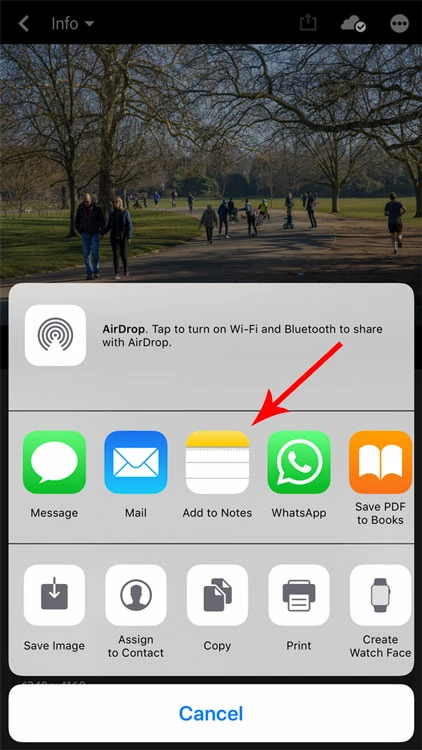
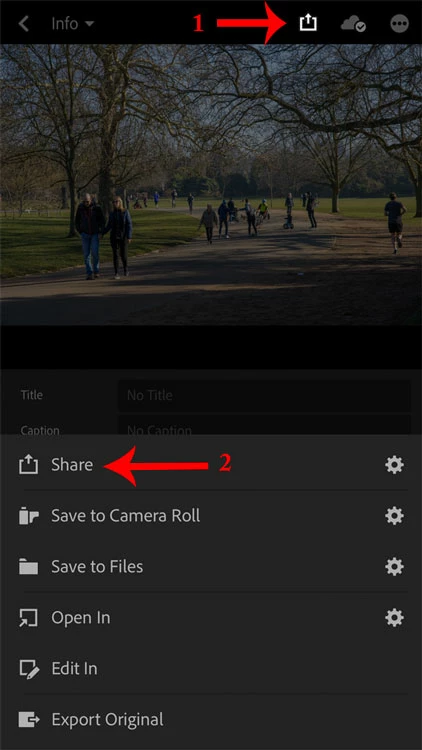
If you have a smartphone you will get more options. Open Lightroom, select a photo and click share – see images below – and click the second share button. Choose jpeg, small size 2048 and then choose one of the services. Many such as Facebook now only permit sharing from iOS or Android devices and not from desktop.

2 replies

Hilde Maassen
Participating Frequently
May 12, 2019

I saw this problem more often when my students first used i-photo to get the images on their computer before opening Lightroom; I don't think you did that did you? I-photo converts them into jpeg's.

jimbraden
jimbradenAuthor
Participant
May 12, 2019

If I photo is the photo storage marked with flower looking  ID on computer screen Yes I did... But i downloaded about 6 images straight to Lightroom and I think they show up as jpegs also..... What do I need to do to download pictures properly   Thanks for your reply

Hilde Maassen
Participating Frequently
May 12, 2019

Yes, the flower icon program makes jpeg's of everything.

to add your images straight from the Nikon into LR

1. Open LR

2. insert the SD card in the computer

3. Click the + button

4. select the card

5. choose review for import

6. select the images you like to add

7  click import

8. To check if they are jepg's or RAWs: clik on the i-button (left bottom corner)

99jon
Legend
May 10, 2019

What do you mean "when I get ready to move photos"

Which version do you have installed  - from the menu go to Help >> About Lightroom...

Can you tell us the build number and version.

jimbraden
jimbradenAuthor
Participant
May 10, 2019

Thanks for the reply...Get ready to post on social media....  At this time i am away from computer but I just downloaded Lightroom CC  Last week some time...Useing a Macbook Pro computer...This is my first time using Lightroom so I am totally lost....I am an old man but pretty good at figuring out things

Community Expert
May 10, 2019

'Right click on it  box comes up  that says inhance photo  click on that and it says cannot do this because it is jpeg...."

"Enhance Details" is a little different than it sounds and it is brand new.  It does not work everywhere.  Google reading will suggest it doesn't do much except for very specific conditions.  It requires the very latest Windows version and "This feature applies to raw mosaic files from cameras with Bayer sensors (Canon, Nikon, Sony, and others) and Fujifilm X-Trans sensors." 

As a new user my suggestion is to bypass that feature and use the other great stuff that is more typical to a Lightroom CC workflow.  

My screen looks like this on a known Panasonic camera RAW file: