


Mario_tr
Inspiring
June 24, 2017
Answered

Re: Creative cloud high cpu usage on Windows 10

  • June 24, 2017
  • 2 replies
  • 6125 views

This is a sample of my computer standby state (no adobe software running)
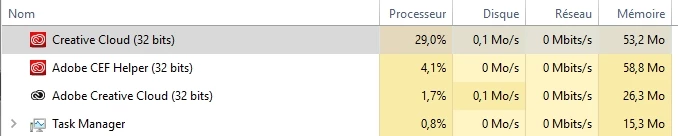
Version of Creative Cloud 4.1.1.202

This topic has been closed for replies.
Correct answer Jeffrey_A_Wright

Branching to a new discussion.

Mario_tr have you been able to implement the steps listed in High CPU usage due to CEPHtmlEngine​?  Did you receive any error messages while implementing the steps listed?

Also to confirm are you using a 32-bit version of Windows 10 or 64-bit?

2 replies

Participant
January 2, 2022

I have the same issue. I don't understand why an app in backgound that does nothing uses most of the CPU available on my computer. Please fix it as possible because I will close my subscription to adobe cloud. In general consider fixing all your products because I have a lot of issue with other Adobe products and it's really not professional to propose such tools to professional users.

Participant
February 25, 2022

Adobe is more concerned about protecting its software than making sure it works properly for those who paid for it...

Jeffrey_A_Wright
Community Manager
Jeffrey_A_WrightCommunity ManagerCorrect answer
Community Manager
June 26, 2017

Branching to a new discussion.

Mario_tr have you been able to implement the steps listed in High CPU usage due to CEPHtmlEngine​?  Did you receive any error messages while implementing the steps listed?

Also to confirm are you using a 32-bit version of Windows 10 or 64-bit?

Mario_tr
Mario_trAuthor
Inspiring
June 26, 2017

Thank you for your answer

CEPHtmlEngine is not running

At this precise time Creative Cloud use 22,8% CPU

and

Adobe Genuine Software Integrity Service use 16,5% CPU

Adobe CEF Helper use 4,9%

Without any Adobe software running

I am using a 64 bits Windows 10 Professionnal with 16Mb of RAM

Jeffrey_A_Wright
Community Manager
Community Manager
June 26, 2017

Ok thanks for the update Mario_tr.  Please reinstall the Adobe Creative Cloud desktop application utilizing the steps listed in "Failed to install" error received when installing Adobe Creative Cloud desktop app .  If you have any questions regarding the steps listed you are welcome to update this discussion.

If you continue to see high CPU usage can you please respond with the Adobe software titles, and versions, that are currently installed on the computer.
