


sfmike99
Inspiring
May 28, 2018
Answered

Re: Creative Cloud installer hangs on initializing installer

  • May 28, 2018
  • 4 replies
  • 10081 views

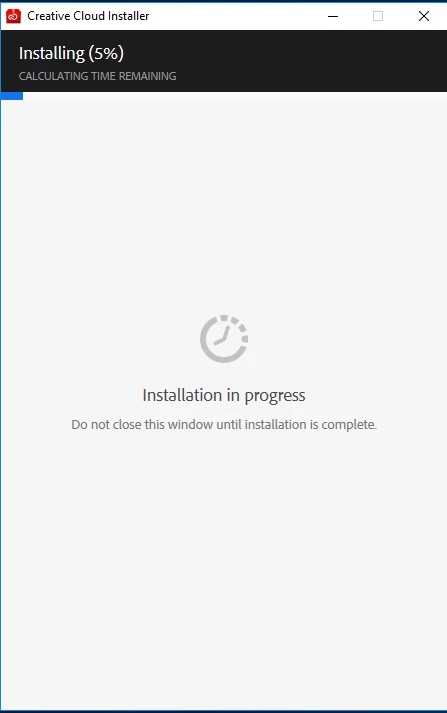
I am also having trouble installing Creative Cloud. Fresh Windows (newly formatted) 10 build and worked perfectly on Windows 8. Download installer from Adobe site but gets to 5% and hangs (see screenshot). Have given it an hour or more but never moves. Followed above procedure, but only change is it now asks me to login first.
This topic has been closed for replies.
Correct answer sfmike99

Oops ... that was my bad about performance. Turns out I had "network discovery" off on my new machine, so wasn't able to get to my NAS where files were stored...

4 replies

Participant
December 11, 2018

After a few hours of trying things, this worked for me.

I CREATED NEW USER FOR WINDOWS

I DELETED ALL MY ADOBE FILES FROM MY COMPUTER (not PSD’s and work files, just the installation filles located usually in C:\ )

I USED THE ADOBE CLEANER TOOL  https://helpx.adobe.com/ro/creative-cloud/kb/cc-cleaner-tool-installation-problems.html

RESTART MY COMPUTER.

EVERYTHING WAS BACK TO NORMAL!

sfmike99
sfmike99AuthorCorrect answer
Inspiring
June 8, 2018

Oops ... that was my bad about performance. Turns out I had "network discovery" off on my new machine, so wasn't able to get to my NAS where files were stored...

sfmike99
sfmike99Author
Inspiring
June 8, 2018

After fresh Windows 10 install on my new computer, CC and LR Classic both installed without issues. Performance though is shockingly bad with this version (7.3.1) - takes minutes to open and edit a photo. Sigh...the fun continues on another thread.

Bani Verma
Community Manager
Community Manager
May 29, 2018

(Branched out as a new thread)

Hi Sfmike99,

As you have mentioned you are unable to install the Creative Cloud desktop app as it is stuck at 5% and you have also performed some troubleshooting steps to resolve it , however the issue still persists.

Could you please let us know if you have any anti-virus, system firewall, system optimizer, internet or browser security software installed on your machine? These apps can cause the Creative Cloud desktop app to stop working, specially a system optimizer software.

I would request you to turn off these apps for the time being and then use the direct download links given here: Download Creative Cloud desktop app   , to download and install the app.

Let us know if this helps.

sfmike99
sfmike99Author
Inspiring
May 29, 2018

Hi Bani,

Yes I tried all the steps listed in the previous thread. I am using just the included Microsoft security tools, but disabled the firewall with no change.

When I download the package using the link provided, a different install screen pops up which goes to approximately 2% then disappears. No sign of CC in my installed or running apps.

What I'm trying to do is install Lightroom Classic CC. I found this link for direct download, but that fails with yet another error:

Your help is appreciated!

Laethageal
Participating Frequently
May 30, 2018

I had similar trouble.

Just fixed it by removing the following folder :


  • C:\Program Files (x86)\Common Files\Adobe\OOBE
  • C:\Users\[username]\AppData\Local\Adobe\OOBE
  • C:\Program Files (x86)\Adobe\Adobe Creative Cloud
  • C:\Program Files (x86)\Common Files\Adobe\AdobeApplicationManager