
Participant
July 19, 2020
Question

Re: That does look like Adobe's update notification. Note th...

  • July 19, 2020
  • 2 replies
  • 381 views

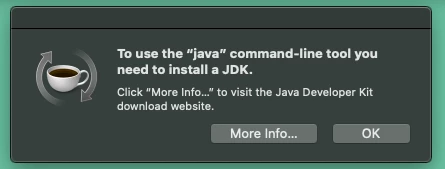
I'm having the exact same problem for months now and have yet get a clear answer from Apple, Google or Adobe. How do I stop this super-annoying window to stop appearing on my desktop. I have tried to follow the instructions but it always points me to the Flash download page with no further instruction for fixing the problem. Never works, problem never goes away. This began to appear when I signed up for the Creative Cloud service which I am about ready to cancel. This happened before which prompted me to cancel my previous Adobe Creative Cloud account a couple of years ago. Please help me fix this. I am using a Apple MAC MINI with macOS CATALINA version 10.15.5, Google Chrome browser. My Creative Cloud account crashes all the time and I have had to reinstall it numerous times just to get Bridge to work. Phototshop barely works at all. It is so slow I stopped using it. I don't use Lightroom because your products do not work on my sysytem? How can I resolve this Adobe?


    This topic has been closed for replies.

    2 replies

    Nancy OShea
    Community Expert
    Community Expert
    July 19, 2020

    You probably upgraded to Catalina BEFORE removing old 32-bit apps from your system which creates instability issues.


    1. Remove all Adobe apps from your system with the Adobe Cleaner tools. 

    https://helpx.adobe.com/creative-cloud/kb/cc-cleaner-tool-installation-problems.html


    2. Ensure your computer meets or exceeds the minimum system requirements to run Catalina + Creative Cloud + all other apps you intend to use.  An underpowered machine will not give you a good user experience.  Catalina alone requires 4 GB of RAM and 12.5 GB of HD space.
    https://helpx.adobe.com/creative-cloud/system-requirements.html


    3. If your system can handle it, re-install the latest CC Desktop app, Bridge & Photoshop. Then restart your computer.


    Nancy O'Shea— Product User & Community Expert
    Participant
    July 21, 2020

    Followed your instructions and so far so good! 

    Thanks Nancy - you are the only person who was able to help me.

    Participant
    July 23, 2020

    Looks like I spoke too soon. The problem of the error message (see image sample in the msg string) has reappeared despite the fact that I followed the instructions to the letter. Now I am receiving an error message every day that says Creative Cloud is broken and it has to be re-installed. This has been going on for months. I have wasted at least 10 hours just in the past week deleting and reinstalling your products and they still don't work. How will you resolve this Adobe? It is shocking how unreliable your products are now and this Creative Cloud app is the most unreliable application in the suite. Photoshop used to be the standard, but now I have to go back to using Apple's Photo application to process my images. Apple's products work well and are reliable - Adobe's usually don't work, and seem like they are a waste of time and money.  Apple's customer service is exceptional and they will do whatever hey can to help customers. I am going to call Adobe's help line now for one final attempt to resolve the issues I am facing.  This Adobe Support Community forum is a joke. If not resolved I have no choice but to cancel my subscription.

    _maria_
    Legend
    July 19, 2020

    Sounds like your issue is completely unrelated to the thread you replied to.  Flash Player and Creative Cloud are completely separate products and Creative Cloud doesn't include Flash Player.  As per the screenshot you include, it's Java, again not Flash Player.  Moving this to Creative Cloud forum.  Perhaps somewhere there can assist.