Participant
October 11, 2017
Answered

Receiving error when reinstalling Adobe Creative Suite Design Standard CS5.5 for Mac

  • October 11, 2017
  • 2 replies
  • 324 views

I just updated my computer and I'm trying to reinstall Adobe Creative Suite Design Standard CS5.5 for Mac that I purchased several years ago.  I keep receiving this error when I double click on install.
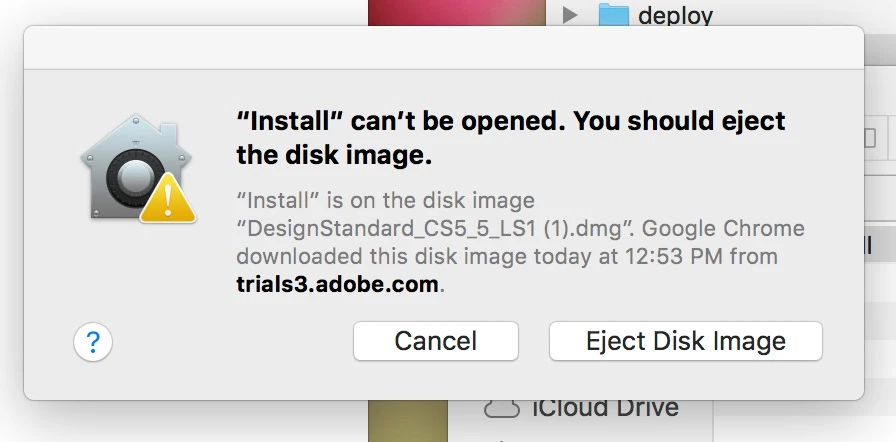
Does anyone have any suggestions?

I downloaded the Mac/English file from here: Download Adobe Creative Suite 5.5 products  which is where the chat suggested I download it from.

Thanks!

This topic has been closed for replies.
Correct answer Jon Fritz

In the latest MacOS, the old installers won't work without a couple extra steps...

Installing Creative Suite on macOS 10.12 (Sierra)

2 replies

angimurAuthor
Participant
October 11, 2017

So I was able to install everything but one of the programs this way.  I continue to get a message that I have to close safari before the installation can continue.  However, Safari is not open on my computer.

Any suggestions?

John T Smith
Community Expert
Community Expert
October 11, 2017
angimurAuthor
Participant
October 13, 2017

thank you!

Jon Fritz
Community Expert
Jon FritzCommunity ExpertCorrect answer
Community Expert
October 11, 2017

In the latest MacOS, the old installers won't work without a couple extra steps...

Installing Creative Suite on macOS 10.12 (Sierra)

angimurAuthor
Participant
October 13, 2017

Thank you!