DyettandBhatiaAdmin
Participant
October 11, 2016
Answered

Reinstall CS5 on Mac

  • October 11, 2016
  • 2 replies
  • 1431 views

I have updated my OS to Sierra.  Things stopped working.  Adobe customer care instructed me to uninstall and reinstall my CS5.  Now i am unable to reinstall my CS5 onto my computer.  I am getting an error message after clicking on the installation saying "Install can't be opened. You should eject the disk image".  I click "Eject Disk Image", I still do not have CS% installed.  Please help!!!!!

    This topic has been closed for replies.
    Correct answer Bani Verma

    Try the below steps and see if that helps and share the results:

    • Mount the Disk Image file for the Creative Suite application.
    • Open the mounted DMG file.
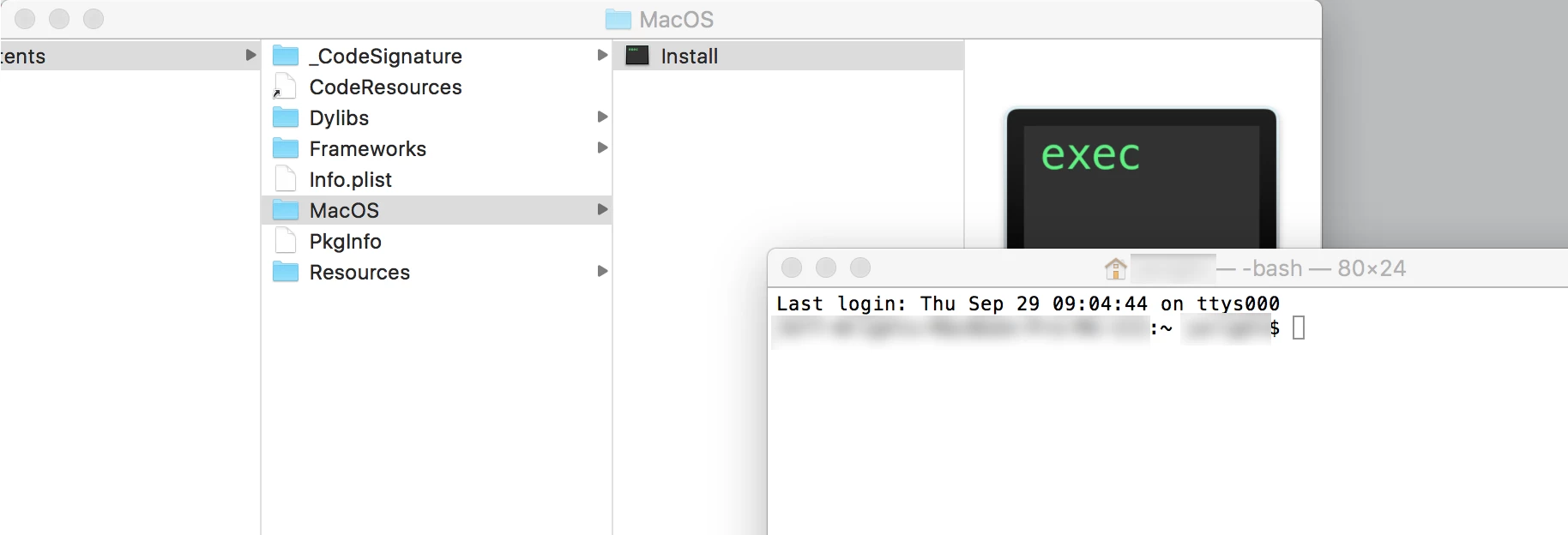
    • Right-click Install.app and select Open Package Contents from the context menu.
    • Navigate to Contents > MacOS.
    • Drag the Unix executable to the Terminal. (Go to > Utilities to open the Terminal window.)
    • Press return to launch the installer.

    2 replies

    Participant
    September 8, 2022

    I've followed instructions from Bani Varma as below, starts to open & then crashes & I get the message - Adobe Application Manager quit unexpectedly. I've use CS5 on 17" Macbook pro/OS10.13.6 for some years but now only Photoshop opens.

    Hope someone can help.

    kglad
    Community Expert
    Community Expert
    September 8, 2022

    this thread is 5 1/2 years old and things have changed, though it's (for now) still possible to activate cs5 on compatible os'es.

    Participant
    September 9, 2022

    I really have no idea how, I have:

    I have downloaded from my Adobe Account the DesignStandard_CS5_5_LS1.dmg (ScreenShot 1).

    I Cannot find a link to download Adobe Support Manager – everything seems to pitched at Creative Cloud

    Any direction you can point me to will be much appreciated.

    Bani Verma
    Community Manager
    Community Manager
    October 11, 2016

    Hi Ellien54675345,

    Kindly refer to the below mentioned thread as a similar issue has been addressed there:

    CS5 install on OS Sierra

    Let us know if this helps.

    Participant
    October 11, 2016

    Getting closer to a solution but still isn't working for me.

    Navigating to the terminal window still isn't letting me open the files on my mac. Have tried with CS5.5, AE, PH, etc. Apple support haven't been able to help me open the files either.

    Bani Verma
    Community Manager
    Bani VermaCommunity ManagerCorrect answer
    Community Manager
    October 11, 2016

    Try the below steps and see if that helps and share the results:

    • Mount the Disk Image file for the Creative Suite application.
    • Open the mounted DMG file.
    • Right-click Install.app and select Open Package Contents from the context menu.
    • Navigate to Contents > MacOS.
    • Drag the Unix executable to the Terminal. (Go to > Utilities to open the Terminal window.)
    • Press return to launch the installer.