

Josef Knourek
Participant
February 5, 2026
Answered

Reinstalled OS without deactivation of CS 5.5

  • February 5, 2026
  • 2 replies
  • 47 views

Dear all,

   several years ago (2012?) I bought a CS4 + upgrade to CS 5.5. Everything was running fine, when I have moved to new PC I have deactivated the licence and I have activated the new one on the new computer. The process is clear for me. One month ago my computer crashed and I must reinstall OS without deactivation.


During installation I just repeated the procedure and here we go. It ended there:
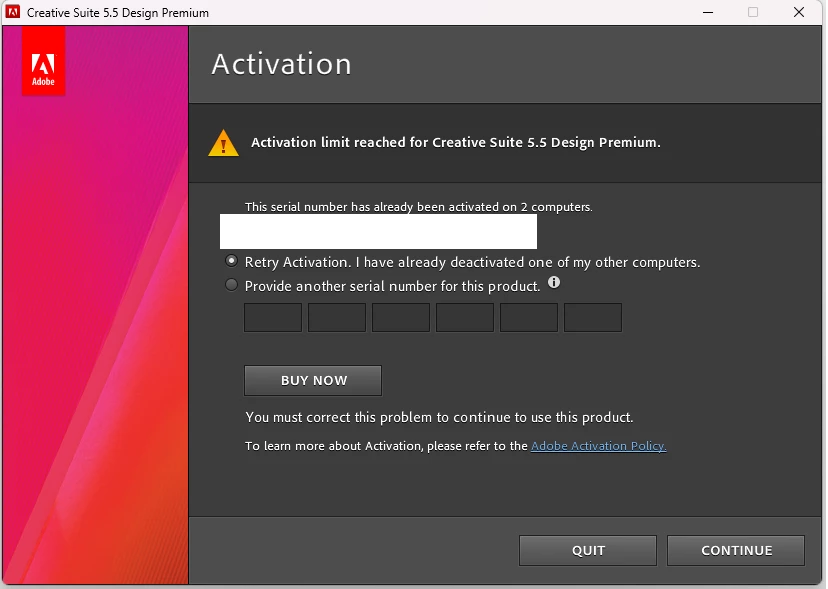
 

I have in my hands two original DVDs and the serial keys. But I can’t deactivate the previous installed copy on OS which is no longer existing. Is there any option how to save the licence? I’m no longer freelancer but I’m still using the software (which was not really cheap) for some personal projects. Official support told me, that they don’t have an access to tools for deactivation of old software on their side.


I don’t would like to believe that I have to throw approx 2 000 $ software to the trash due to this failure…


Any inputs are welcome. Thank you very much for your support!


Josef Knourek

Czech Republic

    Correct answer Jeffrey_A_Wright


    Thanks for posting, Josef. I am sorry, but in 2026, the only way to reclaim a previous activation is to deactivate a previous copy of the software. If you are unable to deactivate the software on its most recent installation, you may want to try deactivating another copy.

    Please be aware that the computer must be up to date enough to contact our servers for the deactivation request to be successful.


    You can find more information on how to manage any remaining activations for your license of Creative Suite 5.5 Premium at 

    .


    If you don’t have access to any other previous installations, or if the software was only installed on the recently formatted computer, then ​@Josef Knourek , you will need to find a new solution for your creative needs in 2026.
     

    2 replies

    Josef Knourek
    Participant
    February 6, 2026

    I was thinking over the night about the situation. I have to say that it’s a good business model to cancel the support and keep running this kind of authentication. It's just a matter of time when the user of old software will have an issue and will be pushed to buy a new software.

    I can understand that in 2011/2012 was easier to build this simple registration and unregistration model instead of checking really running online licences. 

    Instead of solving the situation with some update, or keep the support running, the support has been cancelled. If the user will loose the access to the old computer/HDD/OS for any reason he will lose also the legally bought software (3 months salary for me during that period). Never mind if the user has physically the media, serial keys and original packaging, it's a just a trash from that moment. And the perpetual licence is a just a joke.

    From my point of view this approach is totally unethical. It’s a same situation like if you park the car in parking garage, loose the ticket and the owner of the parking garage will tell you "Sorry I see that you have car keys, the paper work, but sorry you have to go buy a new car. We can recover tickets only for new car models". 

    I will try to find different software. You can close this thread, thank you.

    Jeffrey_A_Wright
    Community Manager
    Jeffrey_A_WrightCommunity ManagerCorrect answer
    Community Manager
    February 5, 2026


    Thanks for posting, Josef. I am sorry, but in 2026, the only way to reclaim a previous activation is to deactivate a previous copy of the software. If you are unable to deactivate the software on its most recent installation, you may want to try deactivating another copy.

    Please be aware that the computer must be up to date enough to contact our servers for the deactivation request to be successful.


    You can find more information on how to manage any remaining activations for your license of Creative Suite 5.5 Premium at 

    .


    If you don’t have access to any other previous installations, or if the software was only installed on the recently formatted computer, then ​@Josef Knourek , you will need to find a new solution for your creative needs in 2026.
     

    Josef Knourek
    Participant
    February 5, 2026

    Hello Jeffrey. Thank you for the quick, but bad news. I’m really disapointed… 


    Jeffrey_A_Wright
    Community Manager
    Community Manager
    February 5, 2026

    You are welcome, and I am sorry, @Josef Knourek . The security changes that allow activations and deactivations to continue to function in 2026 leave no alternative but to deactivate on one of the previous computers.

    The good news is that our updated software, including Elements, uses more robust licensing, download, and installation technology than what was ever available for Creative Suite. 

    If you want more information about any of our current software and services offerings, feel free to update this public discussion thread.  Thank you again for your long-term use of Creative Suite, Josef!