


Participant
July 22, 2021
Question

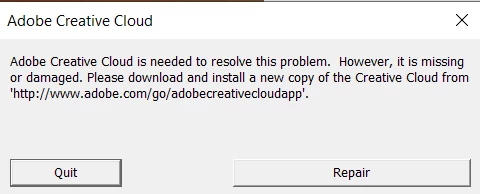
Repeated error message upon reinstalling
  • July 22, 2021
  • 2 replies
  • 232 views


I have been subscribed to CC for a couple months now, a few weeks ago I was hit with this error message that appears each and every time I launch the Adobe Creative Cloud app. I have tried virtually every solution I've found on this forum (though most threads are from a few years ago), including using the Adobe Cleaner Tool and completely wiping my PC to factory settings. Each time I reinstall the app I'm met with this same error message making the programme entirely unusable.


I'm currently subscribed on the student plan which locks me in over a course of 12 (?) months, but at this point I have been continuing to pay while the programme has been useless for at least one of these months. I was hoping to find a solution, or given the option to cancel my subscription if there isn't a way to receive the service that I'm paying for.


Thanks,

Jake.

This topic has been closed for replies.

2 replies

Jeffrey_A_Wright
Community Manager
Community Manager
July 22, 2021

Jake, in addition to the excellent questions posed by Axel, can you provide information on why you are manually opening the Creative Cloud desktop app?  Is the app not opening and launching as part of the startup process?

AxelMatt
Community Expert
Community Expert
July 22, 2021
My System: Intel i7-8700K - 64GB RAM - NVidia Geforce RTX 3060 - Windows 11 Pro 25H2 -- LR-Classic 15 - Photoshop 27 - Nik Collection 8 - PureRAW 5 - Topaz Photo
Jake5C18Author
Participant
July 22, 2021

Hello Axel,


As already mentioned in my original post I've trialled multiple solutions already provided on this forum. This being included in the methods that haven't worked for me.

AxelMatt
Community Expert
Community Expert
July 22, 2021

Before we can say more, please give us more informations including the following : 

Adobe product and version number 

Operating system and version number 

What you were doing when the problem occurred 

Computer hardware, such as CPU; GPU; the amount of RAM; etc 

My System: Intel i7-8700K - 64GB RAM - NVidia Geforce RTX 3060 - Windows 11 Pro 25H2 -- LR-Classic 15 - Photoshop 27 - Nik Collection 8 - PureRAW 5 - Topaz Photo