Participant
October 28, 2020
Answered

Roll back to previous Photoshop version

  • October 28, 2020
  • 3 replies
  • 563 views

I have a $5,000 Canon printer that won't print because of Adobe.  The Canon print program won't work with Photoshop 22.0.0 and Canon told me to roll back to a previous version of Photoshop.  I attempted to unintall version 22 and reinstall an older version but there's no option to do that.  I've tried contacting Adobe customer support at least a half-dozen times.  I gave up on "chat" option after 45 minutes with no response.  A number of phone calls have all ended with silence on the other end of the phone line.  Adobe has set a new standard for awful customer service!
This topic has been closed for replies.
Correct answer Just Shoot Me

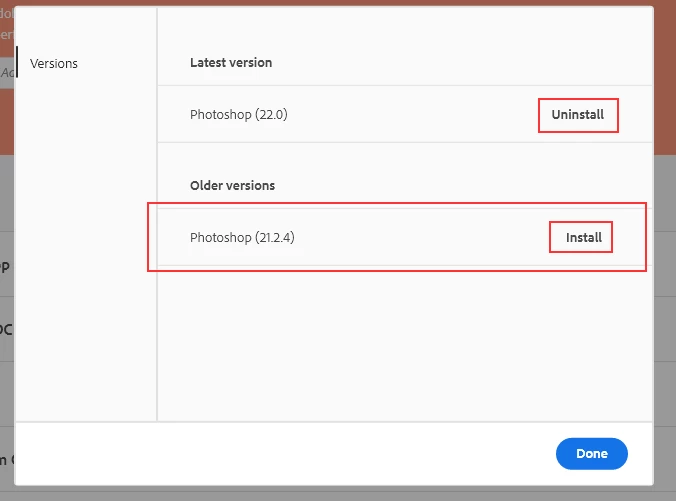
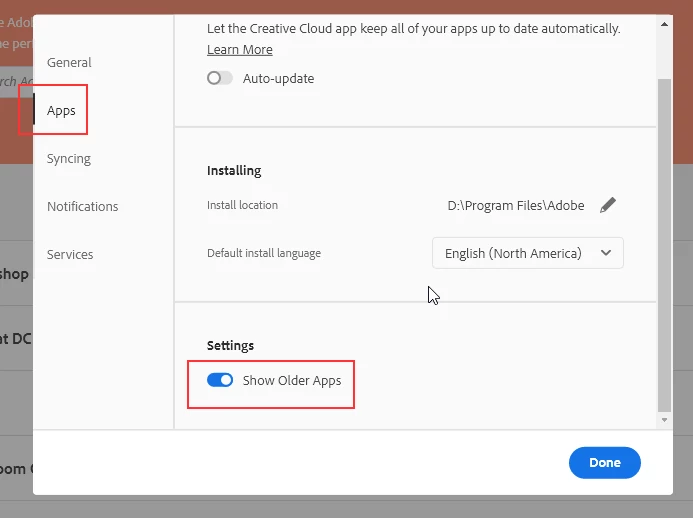
You have to enable the showing of older version in the CC Desktop app Preferences and then click the 3 dots next to the program you want to uninstall and then reinstall the older version.


3 replies

Just Shoot Me
Just Shoot MeCorrect answer
Legend
October 28, 2020

You have to enable the showing of older version in the CC Desktop app Preferences and then click the 3 dots next to the program you want to uninstall and then reinstall the older version.


Participant
October 28, 2020
I agree
Peru Bob
Community Expert
Community Expert
October 28, 2020

Can you print the files from a different program after you edit them in Photoshop?

What file type(s)?