


denisb23663831
Participant
December 10, 2018
Answered

Same device has two names under "Acitvated devices" in Photography Plan account

  • December 10, 2018
  • 2 replies
  • 5062 views

I have two devices activated in my Photography Plan account but one of them now appears under two slightly different names and it actually looks like I have three devices activated which can't be right. I think this might have happened following the last Creative Cloud or Lightroom updates
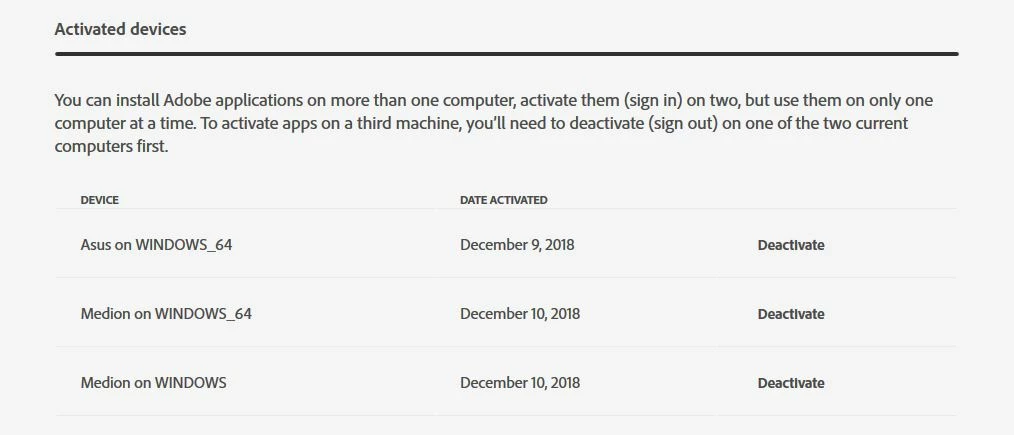
"Medion on WINDOWS" and "Medion on WINDOWS_64" are the same same device.

I currently have both Lightroom Classic CC and the old standalone Lightroom 6 installed on this device and it appears that Lightroom Classic CC is associated with "Medion on WINDOWS_64" while Lightoom 6 is linked to "Medion on WINDOWS". This makes for a very confusing set up particularly when it comes to activation or deactivation of the device either online or by signing in/out using the Creative Cloud app or individual programs. It was a lot easier before when the device just had one name.

Does anybody know if this is normal and, if not, how it might be fixed. I have tried uninstalling everything and re-installing but that made no difference.

This topic has been closed for replies.
Correct answer kglad

oops, i'm sorry.

that is normal.  you have, at least, one 32bit and, at least, one 64bit program activated on your medion computer.  both medion's are listed and recognized as the same computer.

2 replies

Florend
Participating Frequently
August 5, 2021

Hi,

I realise that this reply is long after the original post but I recently had been having the similar problems to those that you posted.

I've just spent an hour with Adobe Tech support who remote linked into both of my computers. They appear to have sorted it for me and gave this link to resolve it myself in future - I just thought that I should pass it on.

https://helpx.adobe.com/in/download-install/kb/adobe-license-issues-keychain-credential-mgr.html

I hope that your problems are long gone and that you are no longer frustrated by this activation issue. Sorry if this has taken up more of your time, just wanted to help if I could.

kglad
Community Expert
Community Expert
December 10, 2018

deactivate the duplicates via the adobe website and then reactivate via your cc desktop app.

denisb23663831
Participant
December 10, 2018

With the two duplicated names deactivated via the website, reactivating the desktop app activates both names again

kglad
Community Expert
kgladCommunity ExpertCorrect answer
Community Expert
December 10, 2018

oops, i'm sorry.

that is normal.  you have, at least, one 32bit and, at least, one 64bit program activated on your medion computer.  both medion's are listed and recognized as the same computer.