


Participant
September 20, 2022
Answered

Security alert
  • September 20, 2022
  • 1 reply
  • 674 views

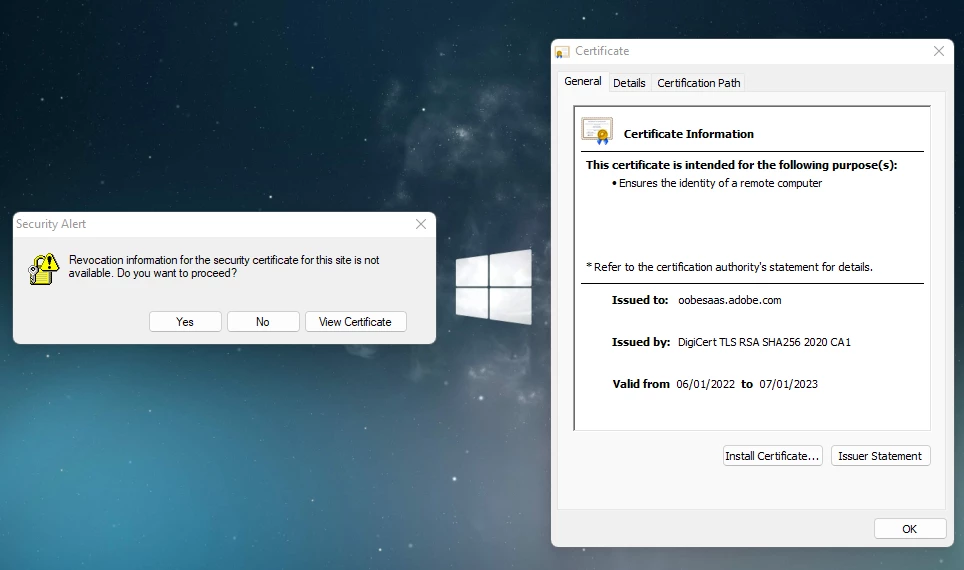
hello, I have just had this issue and I have read the forums but to no luck unfortunately on a solution though I have done what I have been able to find such as updating all adobe products , photshop, acrabat , Creative cloud as well as updating my browser which is opera gx

I have to choose a topic though non are applicable unfortunately.

This topic has been closed for replies.
Correct answer Jeffrey_A_Wright

Inn_Keeper, what action was taken on the computer to trigger the alert in your screenshot?  You can use the steps listed in https://helpx.adobe.com/download-install/kb/adobe-license-issues-keychain-credential-mgr.html to remove the Adobe-related certificates from the Windows Credential Manager. 


Please update this public forum discussion, if you encounter any additional errors or have any questions about the steps listed in https://helpx.adobe.com/download-install/kb/adobe-license-issues-keychain-credential-mgr.html 

1 reply

Jeffrey_A_Wright
Community Manager
Jeffrey_A_WrightCommunity ManagerCorrect answer
Community Manager
September 20, 2022

Inn_Keeper, what action was taken on the computer to trigger the alert in your screenshot?  You can use the steps listed in https://helpx.adobe.com/download-install/kb/adobe-license-issues-keychain-credential-mgr.html to remove the Adobe-related certificates from the Windows Credential Manager. 


Please update this public forum discussion, if you encounter any additional errors or have any questions about the steps listed in https://helpx.adobe.com/download-install/kb/adobe-license-issues-keychain-credential-mgr.html 

Participant
September 20, 2022

Hi, thank you for your reply, I followed this https://helpx.adobe.com/download-install/kb/adobe-license-issues-keychain-credential-mgr.html  and did everything I could and deleted all relevent credentials, and others that article requested. Further more I have restarted my pc and opended adobe services CC, PS and have not found this issue to pop open , However aas for the cause this to trigger, I am unsure, I have not made any changes to my pc, though I did recently return to Uni of which has simmilar software and systems and used a usb that i have used on both devices, though I doubt that is the issue. thank you however for your help. 🙂

Jeffrey_A_Wright
Community Manager
Community Manager
September 20, 2022

Ok, thanks for the update, Inn_Keeper. I would recommend bookmarking https://helpx.adobe.com/download-install/kb/adobe-license-issues-keychain-credential-mgr.html in case the error returns.


You also mentioned you returned to University, you may want to reach out to their Creative Cloud plan administrator for help. They could be affecting the certificates that are installed on the computer.