Seit einiger Zeit sind meine installierten Applikationen in der Creativ Cloud nicht mehr ersichtlich. Wenn ich auf den Reiter "Applikationen" klicke erscheint die Meldung "Seite nicht verfügbar. Diese Inhalte können nicht geladen werden. Versuchen Sie es später erneut". (siehe Screenshot)
So people don't have to download the image you have attached to your post please Edit your post to remove the attached screen shot and include it in the body of the text of your post.
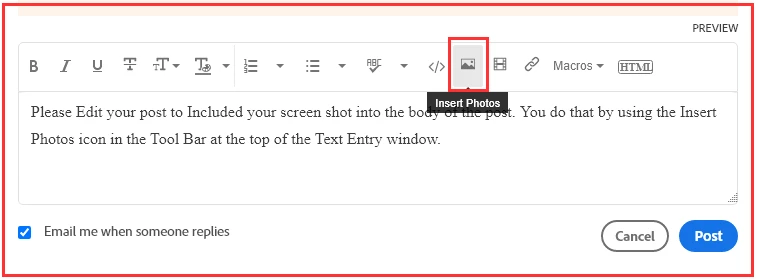
You do that by Clicking the "More..." link at the bottom of your post, Selecting "Edit Message" and then use the "Insert Photos" icon in the tool bar at the top of the Post/Reply/Edit dialog box like this.
My System: Intel i7-8700K - 64GB RAM - NVidia Geforce RTX 3060 - Windows 11 Pro 26H2 -- LR-Classic 15 - Photoshop 27 - Nik Collection 9 - PureRAW 6 - Topaz Photo AI
So people don't have to download the image you have attached to your post please Edit your post to remove the attached screen shot and include it in the body of the text of your post.
You do that by Clicking the "More..." link at the bottom of your post, Selecting "Edit Message" and then use the "Insert Photos" icon in the tool bar at the top of the Post/Reply/Edit dialog box like this.
Translate
My System: Intel i7-8700K - 64GB RAM - NVidia Geforce RTX 3060 - Windows 11 Pro 26H2 -- LR-Classic 15 - Photoshop 27 - Nik Collection 9 - PureRAW 6 - Topaz Photo AI
Ich habe den Client neu downgeloadet und neu installiet. Ich habe den Inhalt des "OOBE" Verzeichnisses gelöscht. Nützt alles nichts. Nach erneuter Anmeldung am CC Client erscheint die geliche Meldung




 AdChoices