Thanks for reporting this. Below are quick steps to stop creation of "GPUCache folder on desktop" when launching Creative Cloud:
- Open Creative Cloud "preferences" and click "Quit" button.
- Delete "Adobe Creative Cloud" shortcut & "GPUCache" folder from desktop.
- Open folder location: "C:\Program Files (x86)\Adobe\Adobe Creative Cloud\ACC" and right click on "Creative Cloud.exe".
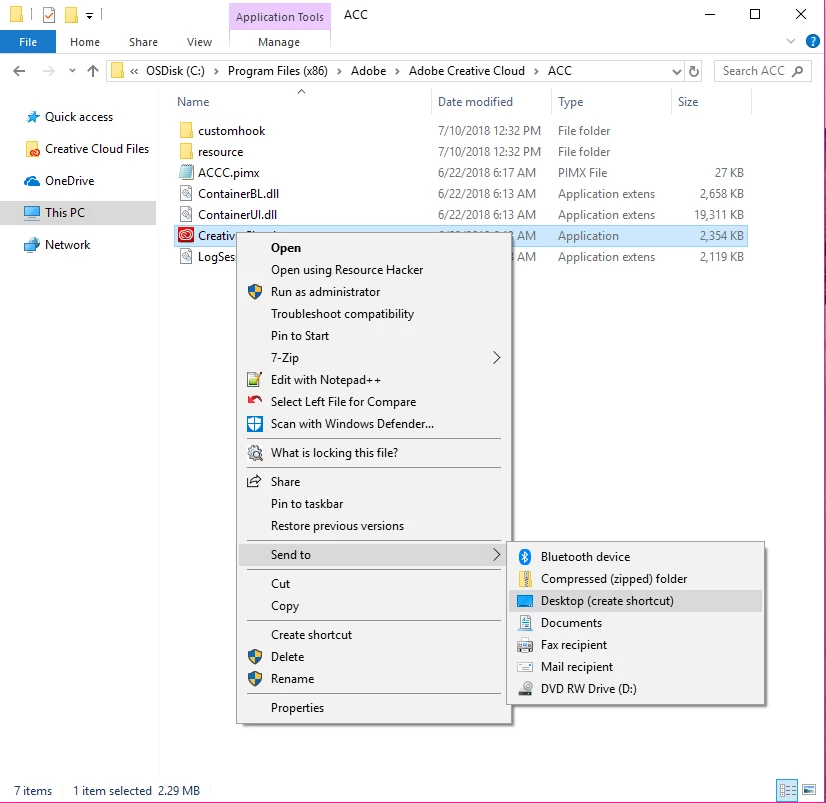
- In the context menu select "Send to" and then select "Desktop (create shortcut)".
- It will create a new shortcut for "Creative Cloud.exe" on desktop.
- Launch Creative Cloud from desktop shortcut.
- GPUCache folder will not be created again.
Do let us know in case you face any issues with these steps.




 AdChoices