

gps03
Known Participant
May 15, 2012
Question

Successfully Installing & Activating CS6 (not Creative Cloud) behind an Authentication Proxy server

  • May 15, 2012
  • 13 replies
  • 614366 views

If you are like me and work in a fairly secure office where all Internet access is routed through an authenticate proxy server (you have to use an ID and password to get to the Internet) you might have noticed that installing CS6 products can be difficult.

The installer told me to go to http://www.adobe.com/go/getactivated for an offline activation.

It is not practical to "Disable the firewall" or"Disable the proxy" as most of us worker bees have neither the authority or ability to do such a thing.

So back to that last bit: "Disable the proxy server." Well I could not do that, but I could disable my PC's ability to connect to the proxy and therefore make it seem like I had no Internet whatsoever. And lo and behold all the right prompts appeared and offline activation sailed along smoothly!

This is a little long, but I wanted to include lots of screen shots so you'll know what to expect.

Here's how I did it:

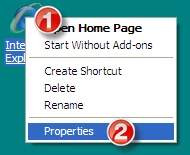
1. Right-click the Internet Explorer Icon on your desktop (or select Tools > Internet Options in IE)

2. Click Properties.
3. Select the Connections card.

4. Click LAN Settings.
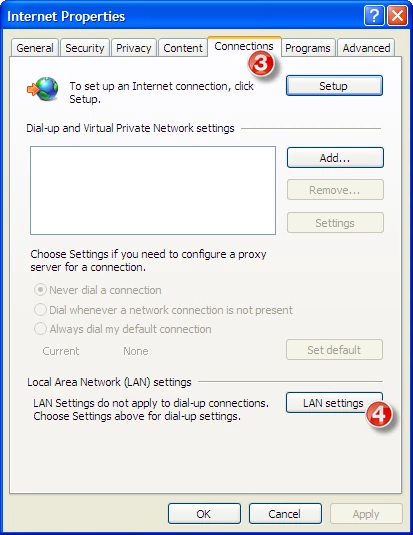
5. Uncheck any boxes (you might want to write down what was in the boxes or grab a screen shot as you'll have to put this back to how you found it later to restore your Internet access). Click OK and OK again. You've now shut off IE's ability to hit your proxy server and therefore the Internet.

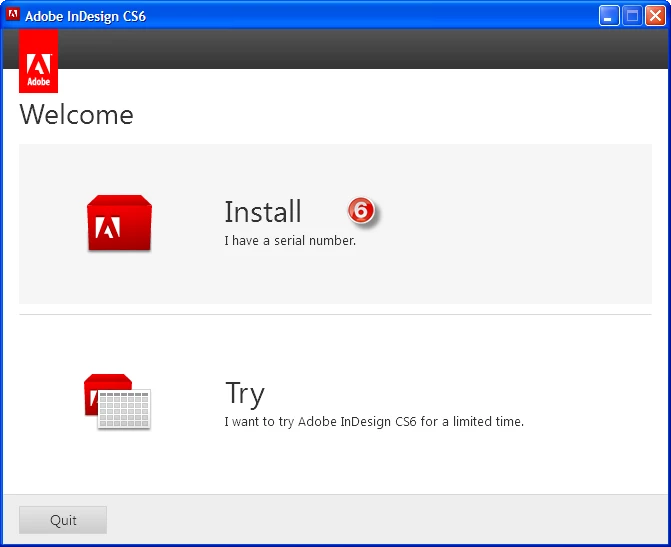
6. Click Install I have a serial number
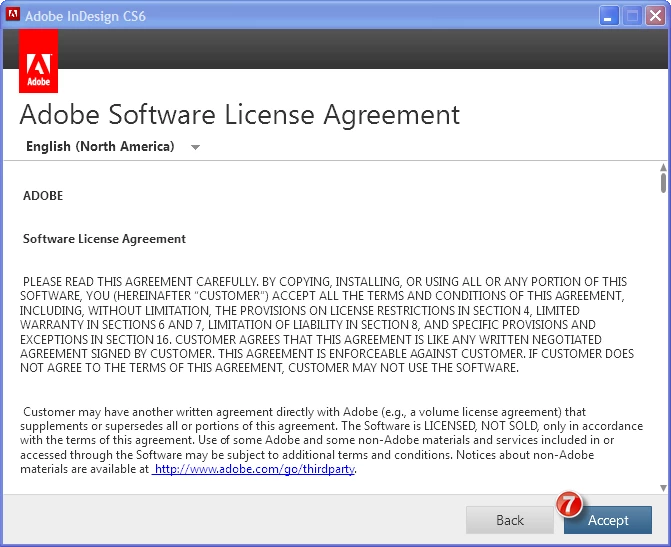
7. Accept the license agreement.
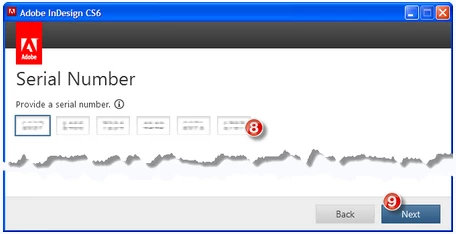
8. Enter your license key.

9. Click Next. At this point the installer will attempt to validate your license, but since you haven't got Internet access, it will give you an error. This is where the process broke down on me, when the installer could detect the Internet but not navigate my proxy.
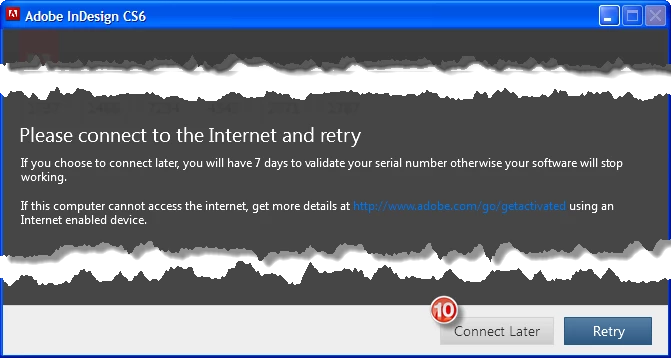
10. But, now beacuse you do not have Internet Access, you'll get this error. Click Connect Later.
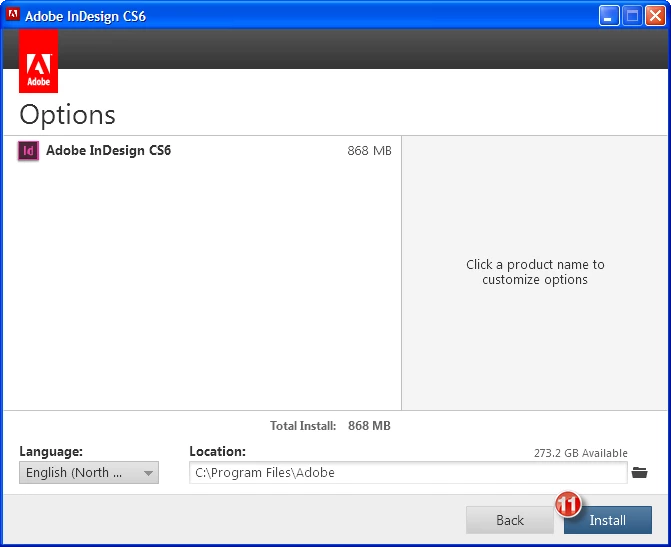
11. Select your customizations (if any) and click Install.
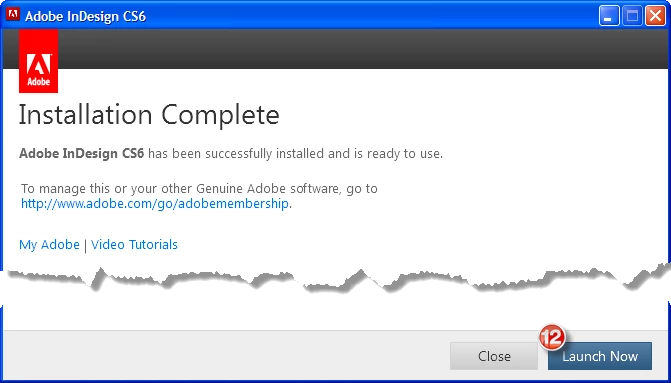
12. When installation is complete, click Launch Now.
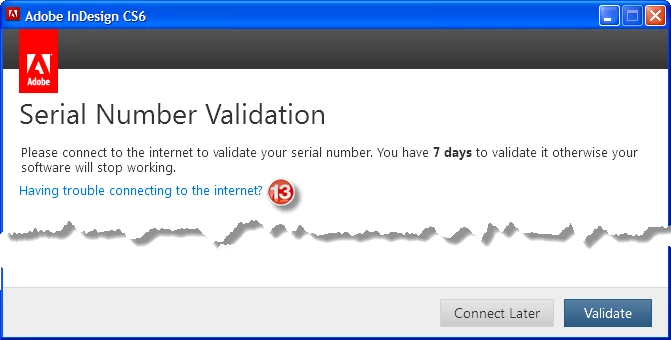
13. You'll get an error since you don't have Internet, click "Having Trouble Connecting to the internet?"
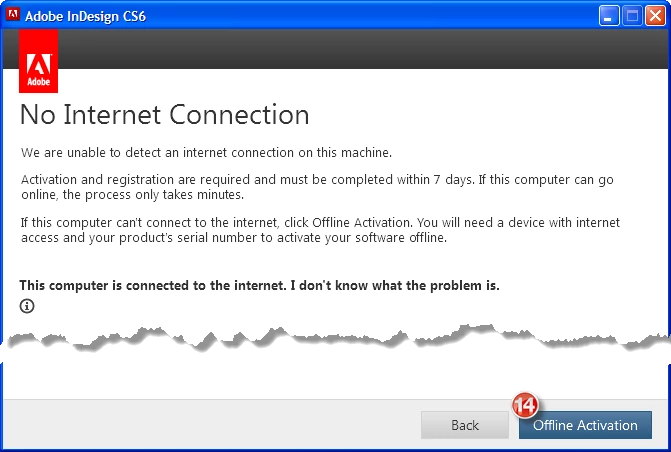
14. Click Offline Activation.
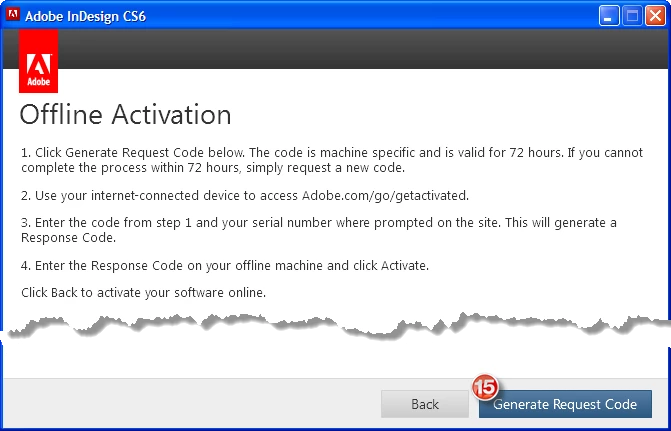
15. Click Generate Request Code.
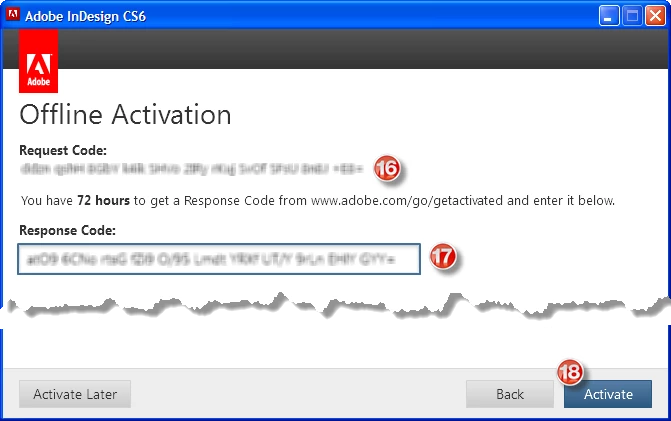
16. Go to http://www.adobe.com/go/getactivated, sign in, put in your request code and serial number and generate the response code.*

17. Enter the response code.

18. Click Activate.
19. Click Launch when you get the Offline Activation Complete dialog.
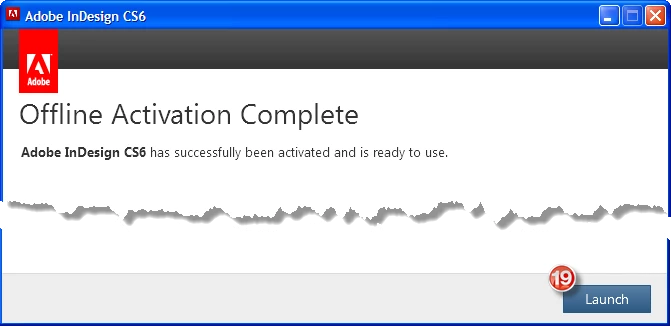
* if you are installing more than one product, generate the response codes for each at the same time. I ran into an issue where once I created a response code, no other response codes I created for subsequent installs were accepted. I had to wait 24 hours for a newly generated code to work.

You are done! Enjoy your software!

Cheers!

-Greg

This topic has been closed for replies.

13 replies

Participant
January 24, 2024

Thank you, thank you, thank you for taking the time to write all that. I was up until 04:am with an Adobe Chat Agent — after having suffered the infuriating as totally useless (as they all are) chatbot long enough to be given the option to communicate with a person — who turned out to be useless as well. All I could get out of the idiot was it is a legacy product and is therefore no longer supported. I despise these tech companies for their snotty, unhelpful attitude. Blackmagic is the same, Apple is the same.


My problem with the instructions you outline is that the sequence does not suit a Mac install. The right windows, buttons and options do not appear when expected.


So, after leaving the useless Adobe so-called support, I attacked the problem again and ‘HALLELUJAH’ I succeeded. I then did the whole thing again on my Macbook, documenting each step with a screenshot as you did, so that Mac users can also install security paranoid Adobe CS6.


As I want to keep this in this thread, where it is relevant — and I anyway do not know how to start a new thread, I will post this as a reply.


However, before I start....

One of the problems Mac users face is that Adobe CS6 is designed for Mac OS 10.6.8 (Snow Leopard). CS5 works on Mac OS 10.12.6 Sierra, but it is slow and clunky, I imagine CS6 would be the same or worse — if it works at all. The problem is that with this CS6 installation you are going to need to go to the internet at some point to activate it and internet access with Mac OS 10.6 Snow Leopard is painful. The browsers simply do not work.


This means that you need to have a second computer standing by to handle the internet access bits while the installation goes ahead on the Snow Leopard computer. Prepare a Text Edit document that can be shuttled back and forth between the two computers. The vital internet information will be the Adobe Request Code and its Response Code and these will be shuttled between the two computers on the Text Edit document. You will NOT be able to get these codes on your Mac OS10.6 Snow Leopard computer. When the time comes to submit a Request Code you will need both computers to get the Response Code.


So, here goes:


1. leave your WiFi off, i.e. no internet connection. Click on Install (I have a serial number)


2. Accept the SLA


3. Enter your serial number and click Next


4. The Error Message appears. Do not panic. Click Connect Later


5. Select Options (including Language option) and click Install


6. Enter Administrator credentials and click OK


7. Install starts …


8. … and finishes ...


9. … with Installation Complete. Click Close


10. Open one of the CS6 applications (Photoshop in this example)


11. Click on Having trouble connecting to the internet? A window should pop up with a Request Code. Copy this to your Text Edit document and send that to your internet connected computer. NOTE: If the ‘Serial Number Validation’ window does not pop up automatically, go to Product Registration in the drop down Menu Bar Help Menu


12. Now change computers. On the internet capable computer go to http://www.adobe.com/go/getactivated. On the ‘Offline Activation’ page click on Generate a Response Code. You will be required to enter the Request Code and the CS6 serial number. You can Copy&Paste the Request Code from your Text Edit document.
IMPORTANT NOTE: the UK Install DVD tells you to go to https://www.adobe.com/go/getactivated_uk. It leads to a dead end because that page cannot be found. Remove _uk from the end and it will work.


13. All being well, a Response Code is generated. Copy this to your Text Edit document and send that back to the OS 10.6 computer.


14. The Offline Activation window is still waiting to be completed. Copy/Paste the Response code from your Text Edit document into the Response Code field ...


15. ... and if the Gods are on your side you will see Offline Activation Complete.


If you want to install CS6 on a second computer, you will have to go through the bloody rigmarole again because those Request and Response Codes will no longer be valid.


FINAL NOTE: there is a small chance that I slightly fkd up the screenshots somewhere around step 11 or 12. It is possible that I missed taking a screenshot of an intermediate step. I cannot verify it now because I have completed my two allowable installs — unless I deactivate, trash it all and start again. No Thank you.

December 17, 2020

Thank you Greg for clearly explaining everything with pictures. I appreciate the kind gesture. Cheers!

Participant
May 27, 2022

I'm coming rather late to this conversation, but I'll add my 2 cents worth for those who are Mac users who are currently trying to reinstall CS6 from scratch and also needing to get CS6 activated afterwards. 

I ran into this situation last month where I needed to get CS6 installed onto a 2015 MacBook Pro (MBP) that I'd recently obtained. I could get the installation accomplished, but activation was impossible. When trying to start one of the newly-installed components of CS6, I would encounter a "Sign In Required" window.  Problem was, when I tried to Sign In, I would end up being directed right back to the original Sign In Required window.  I was stuck in a Sign In loop.  So, there was no way to get activation accomplished. 

I tried a chat with an Adobe support person, but they were not able to help. So, I was left to my own devices. I started what turned out to be a 3-day research binge and finally stumbled across a way to get it all accomplished. 

I posted my findings in the comments section of an article found on a site called "ProDesignTools(dot)com".  That site is dedicated to users of Adobe products and has been operating since 2009.  My comment there was rather long, so I broke it up into PART ONE and PART TWO.  Part One covers my initial search and some background info. Part Two covers the actual step-by-step of how I managed to install (using an alternate method that I found on one of the Adobe forum pages) and then activate CS6 (using some info found in a user reply in another Adobe message area). 

The Part Two section also has screenshots for each of the 18 steps that I describe for installation and activation. 

You can find my comment postings at:  

https://prodesigntools.com/move-adobe-cs5-between-computers-or-windows-to-mac.html


That link will take you to the main article.  If you want to see my comment postings, scroll down to just below the end of that article and my Part One comment should be the first comment that you see there.  Part Two follows after.   

As I was doing my research to figure out this activation problem, I kept running into postings that had bits and pieces of what needed to be done, but never the whole story.  As a result, nothing seemed to work.  The break came when I combined two of the postings together and that allowed me to put together the complete process of how to get installation and activation of CS6 accomplished on my older MBP.  

Since I didn't want anyone else to have to run into the same problems as I did, I decided to produce as comprehensive of a posting as possible so that someone needing to do that could just go through those steps.  Hopefully, those steps will work as well for others as they did for me. 

So, give it a look and see if it can help you!  Good luck and I hope it helps!   

 - David 


Participant
June 29, 2022

Just a "PS" to my previous post:  the link address that I provided in my original reply above is to the main article and my comment there currently appears as the first one you see in the comments shown immediately below the article.  But as other comments get posted there, my comment may become more difficult to find. 

Therefore, I am providing a DIRECT LINK to my comment there so that you can go straight to it instead of needing to search for it.  Here is the direct link address: 


I hope this helps you in your effort to get CS6 installed and activated!  

 -  David 


Participant
December 17, 2020

Thanks so much, Greg!! It was getting really frustrating seeing all the gaps in instructions from others. 

FYI, all, for Mac users, just unplug your eithernet and turn off WiFi to get offline. Duh, I know, but sometimes it's the little things that trip a person up.

bushrak11726635
Participating Frequently
December 17, 2019

Great 

bushrak11726635
Participating Frequently
December 13, 2019

Great

bushrak11726635
Participating Frequently
December 17, 2019

.

Participant
May 26, 2015

gps03 & Jamesdutt,

thanks for the info about the request code.

is there a way to re-enter the serial number?  I entered it in the beginning during the installation (w/o internet,) then try the offline activation.  I wasn't able to get the request code, so I guess it is possible I entered the number incorrectly.  I chatted online with adobe techs later on, got disconnected twice and all I wanted to know was if theres a way to change the number.  They asked so many questions, but never give me a definite answer.

so please, please let me know if there's a way to change the number; otherwise, I'll have to uninstall it and reinstall it again.

thanks a bunch!!!

gps03
gps03Author
Known Participant
July 13, 2015

@imcloud, It's been a while since I did this, but yes I believe you will have to uninstall and start over to get the prompt to enter the Serial number again.

Participant
March 30, 2015

You are an absolute genius, thank you so much, you have saved me hours, days, weeks, possibly a whole life time of trying to sort this out and I was not on a networked system, just my standalone system at home.

Tish

July 10, 2014

Ya its working and great information for installing adobe 6 without internet.

Participant
November 26, 2014

TEST

Vikrant R
Community Manager
Community Manager
August 31, 2012

For a quick demo of the the Offline activation process, and details of activating your computer if your computer is permanently offline.

Participant
September 6, 2012

Just want to point out--after many hours of attempting to activate CS6 software (stumping two Adobe techs in the process)--that there is one important bit of information left out of the directions given above (and it's not in the video either):

These instructions work only if you are starting the installation from scratch.  If you (mistakenly) think that your inability to connect to Adobe's activation server is temporary and go ahead and install the software, you will not be able to get back to the screen to generate a request code (which you need to be able to activate the application).  This is in spite of Adobe's assurance to the contrary that if you don't activate during installation, you can do it later when the application starts.  If you try to activate later, you are taken to an online screen that asks for the "request code"--but you have not been given an opportunity to get that request code.

The only solution I could find:  I had to uninstall Photoshop CS6, then unplug my internet connection, then reinstall the software, watching carefully for the screen that provides the button to generate a request code.  If Adobe is going to require the activation/validation procedure, then it really needs to make it work and correct the error in the software, namely, the failure to provide for offline activation once the software has been installed.

gps03
gps03Author
Known Participant
September 6, 2012

Good tip Jamesdutt!

Apologies that I missed that piece in the instructions. I guess I just overlooked that you might not be starting from scratch.

Cheers!

Participant
May 16, 2012

Thanks for the information. I'll hand it over to our IT Department and let them deal with it.