Participant
September 9, 2016
Answered

The Adobe software you are using is not genuine. CS6 is suddenly "not genuine"?

  • September 9, 2016
  • 14 replies
  • 36008 views

I've been running the CS6 Production Premium since February 2015.  It was purchased and downloaded directly from Adobe.com.

Today when I launched After Effects I received a warning that my software is not genuine.  Clicking "more info" revealed that all the products pass their licensing status, but are each listed as "Tampered Software".

I haven't tampered the software in any way.  It's a clean install on a Mac running El Capitan.

Adobe recommends 3 steps to protect myself and my work:

1. Replace the non-genuine software you are using with Adobe genuine software

2. Uninstall the non-genuine software from your machine

3. Help others by reporting the reseller who sold you the non-genuine software

So I figured I should report the reseller who sold me the software.  It was Adobe.com.

I'm afraid to try to uninstall and then re-install it in case it gets blocked.  It appears to be working fine right now.

Anyone else having this issue?

This topic has been closed for replies.
Correct answer Atul_Saini

Hi Cmaynard69,

In additional what Sheena suggested, I would request you to check this link: Adobe Genuine software FAQ and get more information about Adobe Genuine software.

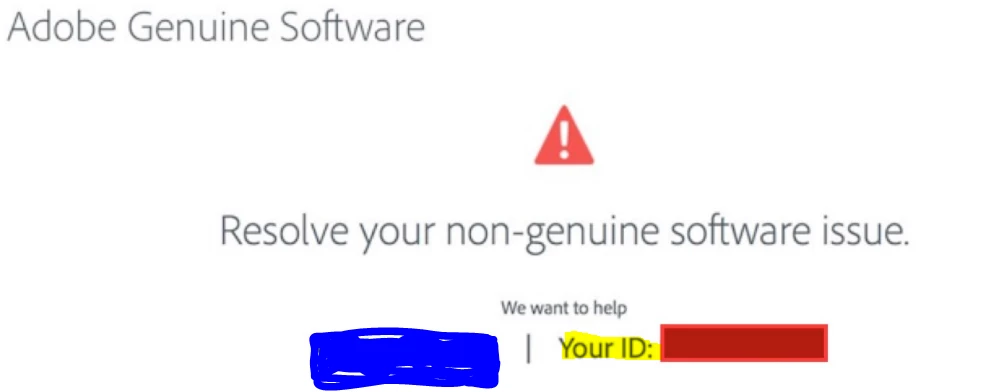
Meanwhile, please share the Serial Number that you have used to activate the application and "Your ID"  as shown in the screenshot via private message, so that we may validate the details and help you with the next course of action.

Thanks.

14 replies

Participant
April 18, 2017

For what it's worth, my boss and I have now BOTH run into this issue on our work machines - and you better believe we have properly licensed and installed copies of CS6. This isn't a problem with one individual install - this is a problem with Adobe trying to push everyone into the cloud. Not acceptable.

David__B
Adobe Employee
Adobe Employee
April 20, 2017

Hi Israelb,

I'm sorry you've encountered this issue. We are currently investigating these reports. I'll send you a private message to collect more information and see what we can do to help.

Thanks,

- Dave

Atul_Saini
Community Manager
Atul_SainiCommunity ManagerCorrect answer
Community Manager
September 9, 2016

Hi Cmaynard69,

In additional what Sheena suggested, I would request you to check this link: Adobe Genuine software FAQ and get more information about Adobe Genuine software.

Meanwhile, please share the Serial Number that you have used to activate the application and "Your ID"  as shown in the screenshot via private message, so that we may validate the details and help you with the next course of action.

Thanks.

Participating Frequently
March 9, 2017

I have a receipt from Adobe Store for my CS6 purchased and downloaded in 2012/13.  Adobe won't remove the popup. They won't check my purchase order. They hijacked my computer with that annoying sales pitch for the cloud which I don't want. I can't reach anyone at adobe who will do more than read from scripts. My software is genuine even if the serial number doesn't come up when they search. THE PURCHASE order is genuine and Adobe should pay attention instead of pissing off another customer. I am out of ideas on how to remove that popup on my mac.

Beverley Gray
Community Manager
Community Manager
March 10, 2017

Hi Photoart

The number you gave the support agent ending with -3365 is not the correct format for a Photoshop CS6 serial number.

Your purchase shows in your account and the upgrade serial number was cancelled and reserialized so it's possible you may not have the product installed with the correct serial number.

I'll ask the support team to follow up with you to check this.

Kind regards

Bev

Sheena Kaul
Community Manager
Community Manager
September 9, 2016

Hi Chip,

Did you get a chance to check the link: Adobe Genuine software ?

Let me know if you have any questions.

Regards,

Sheena

John T Smith
Community Expert
Community Expert
September 9, 2016

>clean install on a Mac running El Capitan

CS6 has not been, and will not be, updated to be compatible with El Capitan or the about to be released Mac Sierra

Run old programs on a new operating system at your own risk of problems