


Participant
January 2, 2014
Answered

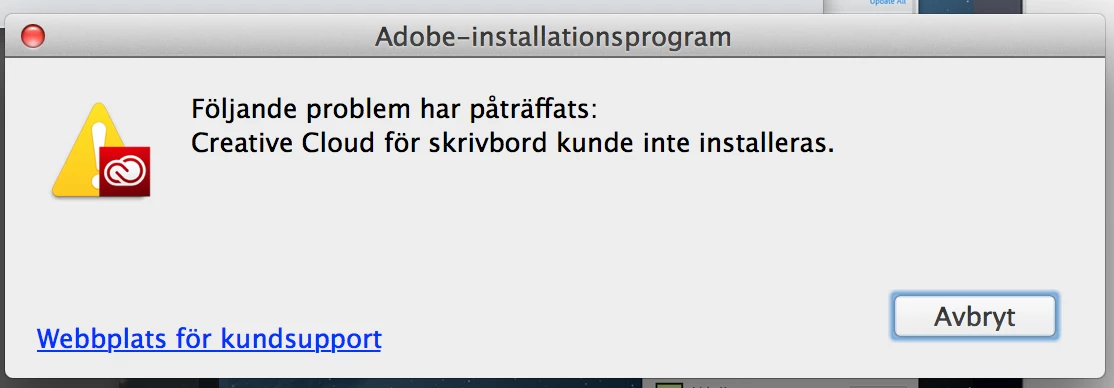
The Creative Cloud App for desktop can't be installed on my Macbook pro

  • January 2, 2014
  • 4 replies
  • 2564 views

I've have bought the Photoshop + Lightroom applications via the creative cloud. I can download the installion file for Crative Cloud app for desktop and I can start the installation process but it is interrupted halfway through with a message saying "The following problem have encountered: Creative Cloud for desktop could not be installed". There are no hints for any solution. I've tried to use Opera instead of Safari but the same thing happens. Is there anyone that knows what the solution for this problem is? Sincerely Lars

This topic has been closed for replies.
Correct answer AMreso

Rename OOBE folder with OOBEOLD ( Mac HD/Library/Application Support/Adobe/OOBE folder )

Run the Adobe cleaner ( http://helpx.adobe.com/content/dam/help/en/support/AdobeCreativeCloudC leanerTool.dmg )

Remove Adobe application Manager/Adobe creative cloud .

Restart the computer and redownload Adobe Creative cloud and install it.

4 replies

Participant
May 17, 2022

asdfghjm,

NightSkyGuy
Inspiring
February 18, 2014

For those having this problem on Windows boxes, please see here:  http://forums.adobe.com/message/5433122

Note that the OOBE folder nonsense is a waste of time on my Windows 7 64bit machine. It always fails to install and must be removed and installed in SAFE mode.

AMreso
AMresoCorrect answer
Inspiring
January 3, 2014

Rename OOBE folder with OOBEOLD ( Mac HD/Library/Application Support/Adobe/OOBE folder )

Run the Adobe cleaner ( http://helpx.adobe.com/content/dam/help/en/support/AdobeCreativeCloudC leanerTool.dmg )

Remove Adobe application Manager/Adobe creative cloud .

Restart the computer and redownload Adobe Creative cloud and install it.

lars5Author
Participant
January 4, 2014

Thank you! You solved the problem!! /Lars

3 jan 2014 kl. 22:34 skrev AMreso <forums_noreply@adobe.com>:

Re: The Creative Cloud App for desktop can't be installed on my Macbook pro

created by AMreso in Creative Cloud Download & Install - View the full discussion

Rename OOBE folder with OOBEOLD ( Mac HD/Library/Application Support/Adobe/OOBE folder )

Run the Adobe cleaner ( http://helpx.adobe.com/content/dam/help/en/support/AdobeCreativeCloudC leanerTool.dmg )

Remove Adobe application Manager/Adobe creative cloud .

Restart the computer and redownload Adobe Creative cloud and install it.

Please note that the Adobe Forums do not accept email attachments. If you want to embed a screen image in your message please visit the thread in the forum to embed the image at http://forums.adobe.com/message/5978280#5978280

Replies to this message go to everyone subscribed to this thread, not directly to the person who posted the message. To post a reply, either reply to this email or visit the message page:

To unsubscribe from this thread, please visit the message page at . In the Actions box on the right, click the Stop Email Notifications link.

Start a new discussion in Creative Cloud Download & Install at Adobe Community

For more information about maintaining your forum email notifications please go to http://forums.adobe.com/thread/416458?tstart=0.

Jeffrey_A_Wright
Community Manager
Community Manager
January 3, 2014

Moving this discussion to the Creative Cloud Download & Install forum.

Lars please see the following discussions where this topic has been discussed:

http://forums.adobe.com/message/5580189#5580189

http://forums.adobe.com/message/5894704#5894704