Ramón Springer
Inspiring
October 20, 2017
Answered

The October 2017 update turned my main apps into testversions.

  • October 20, 2017
  • 3 replies
  • 1354 views

Hi everyone,

I updated last night all my applications and wanted to try them out this morning. But Photoshop, Indesign and Illustrator are all test versions (7days) now. When I try to launch them, it tells me to "log in". When I press the log-in button it tells me "thanks for logging in", hitting "next to launch" brings me back to "you have to log in". And again and again without launching.

I tried restarting my machine several times and uninstalling and reinstalling the apps. No result.

I checked my payment. All fine, October went through two weeks ago.

I can use the 7-day trial now, which is at least something, but I am used to owning the full creative cloud version since 2013.

Any solutions?

Best,

Ramón
This topic has been closed for replies.
Correct answer Ramón Springer

Hello Guys!
my problem is now solved, thanks to the Adobe-Support Service!
Here we go:

1. Log Out.

2. Close Abode Cloud.

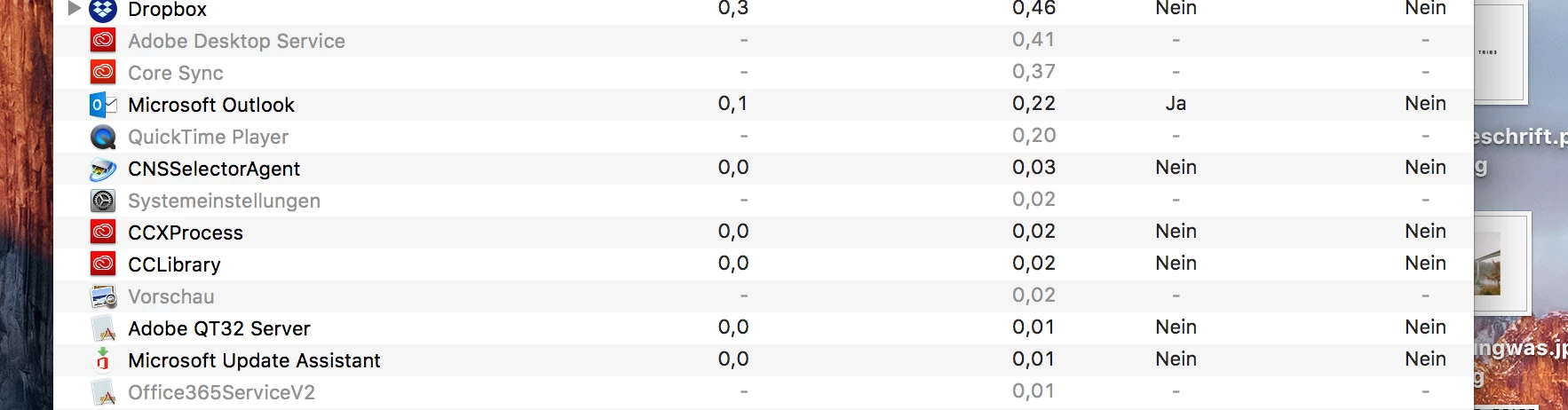
3. Open activity display (on max)

4. Close following: Adobe Desktop Serice / Core Sync

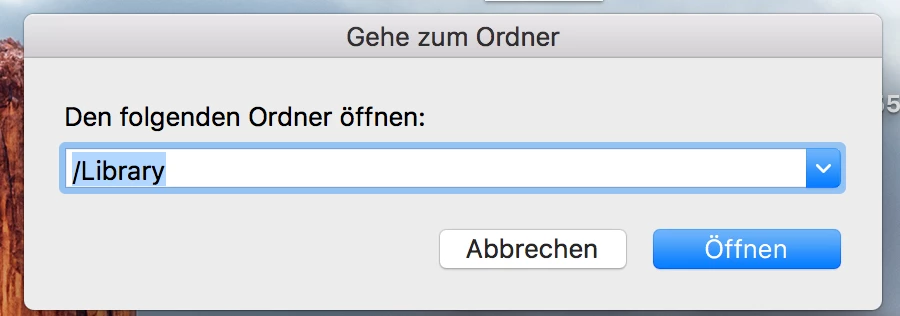
5. Open in Finder Keys: CMD+Shift+G

6. Opens a Window... type in " /library

7 It Opens Library.

8. Now go to Adobe Folder

9. Open The Folder "Application Support" then GO to ADOBE and SCROLL DOWN until you see the FOLDERS in Nr. 10

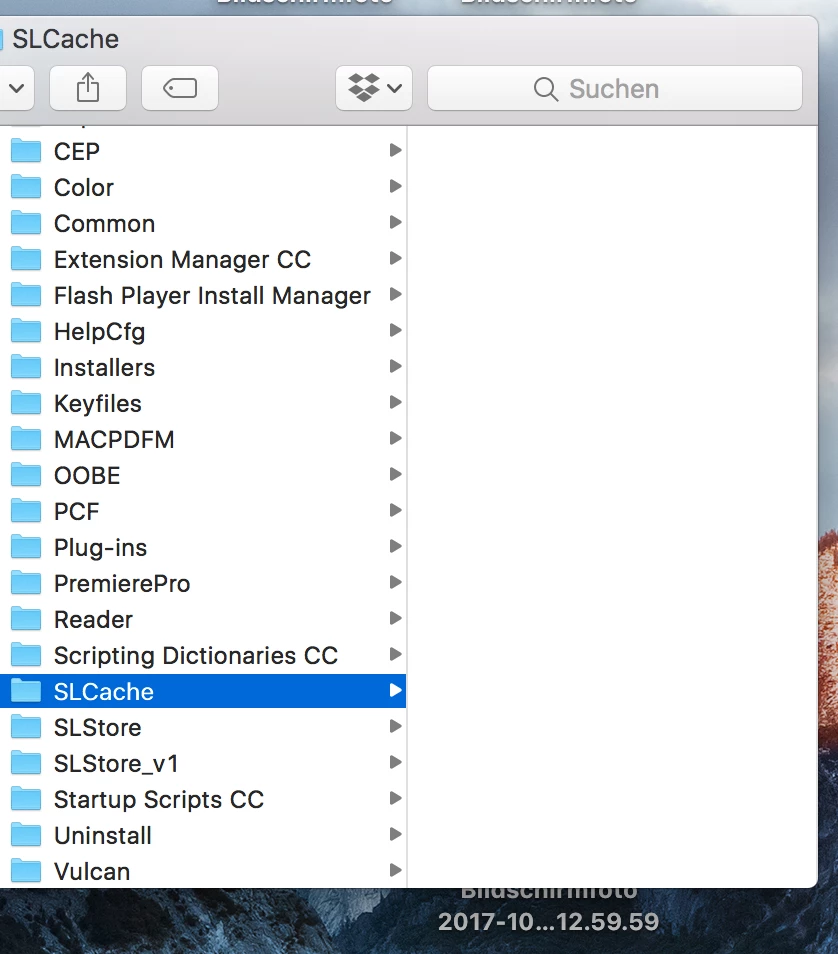
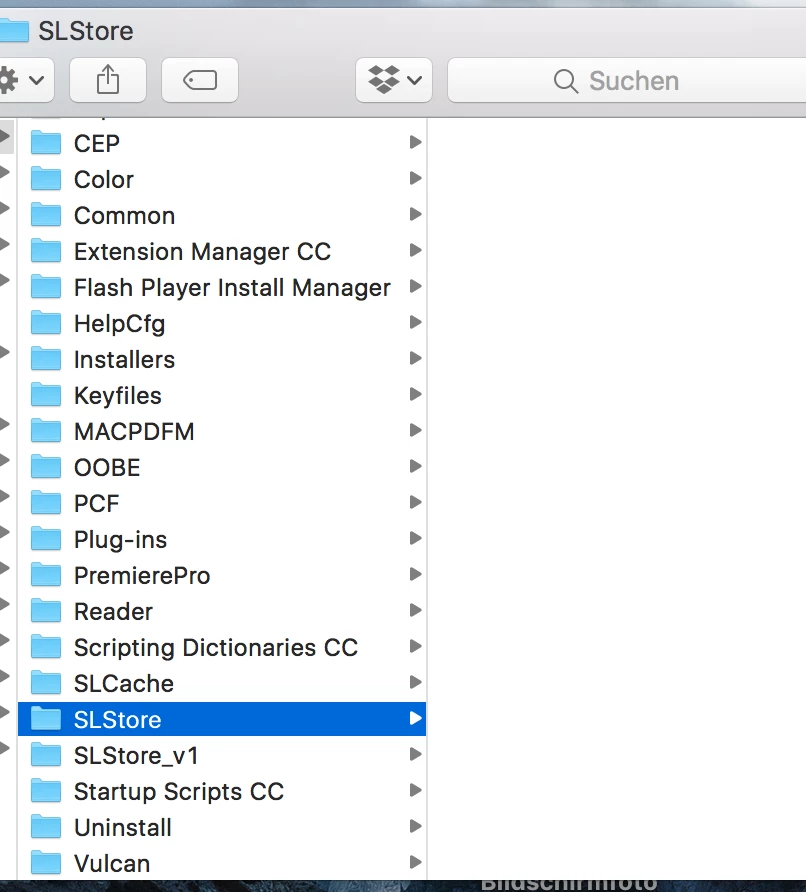
10. Delete The CONTENT ONLY THE CONTENT of following Folders: SLCache and SLStore

NOTE: DONT DELETE THE ACTUAL FOLDER

11. Go to the BIN and Empty the Paper Basket.

12. Start Adobe Cloud and Sign In.

Now Your problem should be solved.

IF NOT, CALL YOUR ADOBE SUPPORT. / THIS HELPED TO SOLVE MY PROBLEM!

greez Vadim Prinz


Thanks Vadim for your elaborate walkthrough. Unfortunately, I use windows 10 (not mac) so I got lost in the messy folder system of windows without finding the right folders... So I had to contact the Support-Service as well and GOT THE WINDOWS SOLUTION:

1. sign off your CC-app

2. close the app

3. open the task manager

4. close ALL adobe services and apps (including the CORE SYNC)

5. go to: C:\Program Files (x86)\Common Files\Adobe

6. delete the folder SLCACHE

7. go to: C:\ProgramData\Adobe

8. delete the folder SLSTORE

9. start CC-App and sign in again

10. DONE (at least for me)

Thanks again Vadim for pushing me into the right direction and THANKS to the Adobe Support Chat!

3 replies

Participant
October 22, 2017

I have the same problem now.
Two days ago I couldn't start any of my apps because there was an infinite loop of "Sign in required". I decided to reinstall creative cloud and all apps. It didn't help. Now I have a trial version of Lightroom and "Sign in required" Photoshop. I've been trying to fix this for 2 days now, no result. I'm wondering if I have to deactivate my subscription and try to renew it again.
I paid 8.10.17 so it should be active.

Nancy OShea
Community Expert
Community Expert
October 21, 2017

Did you sign out of CC Desktop App and close it,  then restart it and sign-in again?

Nancy O'Shea— Product User & Community Expert
vadimp64176170
Participant
October 22, 2017

I sign out and restarted my mac. Started Creative Cloud and Signed in.
After That it shows for a couple of seconds everything as Installed etc. and then "4 More Updates" and then it changes every app that i installed to "try it or buy now"

Participating Frequently
October 20, 2017

I had this to

Ramón Springer
Inspiring
October 21, 2017

"had" implies you somehow overcome this issue? You can give any more information how? I would appreciate it.