
SharonEm
Participant
October 4, 2018
Answered

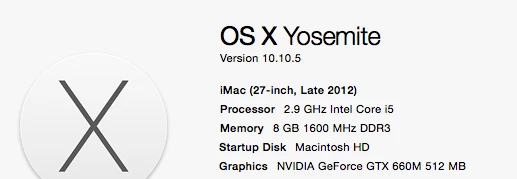
This app is not compatible with your computer - Mac OS 10.10.5

  • October 4, 2018
  • 4 replies
  • 5141 views

Hi,

I've just setup up my account and login for Creative Cloud to being using the apps. I have tried to download apps and have been presented with this message "This app is not compatible with your computer".

I have checked the specs and I believe my mac meets the requirements to use the apps but I'm still unable to download anything.

Can someone please suggest how I will be able to use the apps?

Thanks for your help!
This topic has been closed for replies.
Correct answer Ned Murphy

10.10 is cutting it short...

Adobe Creative Cloud system requirements

"Important: In order to take advantage of the latest operating system features and technologies, the October 2017 release of Creative Cloud apps require Mac OS X 10.11 or higher.

Members running an older version of Mac OS X, such as 10.10, can continue to run and install current and previous versions of the Creative Cloud apps, but they will not be able to install or run the October release of the Creative Cloud apps until they upgrade to a supported version of Mac OS X. Apple provides a free update to the latest version of Mac OS X (10.13).
"

4 replies

hismaimai2000
Participant
October 6, 2018

Should you go to the operating system that matches the MAC you are using, I have trouble with your MACBOOK because of improper upgrade.

John Waller
Community Expert
Community Expert
October 5, 2018

That's an old computer and, even if you install older versions of Cloud apps, those specs are underpowered for running most Cloud apps.

Which apps did you plan on using?

Just Shoot Me
Legend
October 4, 2018

It is because you are using Yosemite, OS X 10.10.x. Apple has now released OS X 10.14.x. That is 4 versions of OS X newer than what you are using.  Newer Adobe Apps only run on newer versions of OS X. If you check the specs for the specific Adobe app you are trying to install it will list the OS X version number requirements for the specific App version. In the CC DTA there is a way to install older versions of the Adobe CC Apps that will work on OLD versions of OS X.

Ned Murphy
Ned MurphyCorrect answer
Legend
October 4, 2018

10.10 is cutting it short...

Adobe Creative Cloud system requirements

"Important: In order to take advantage of the latest operating system features and technologies, the October 2017 release of Creative Cloud apps require Mac OS X 10.11 or higher.

Members running an older version of Mac OS X, such as 10.10, can continue to run and install current and previous versions of the Creative Cloud apps, but they will not be able to install or run the October release of the Creative Cloud apps until they upgrade to a supported version of Mac OS X. Apple provides a free update to the latest version of Mac OS X (10.13).
"