


sarahp49729976
Participant
March 23, 2021
Question

Trail Version Install of Adobe Captivate Error 183

  • March 23, 2021
  • 1 reply
  • 318 views

I uninstalled my trial version of Adobe Captivate because it was glitchy and thought if I installed it, it would fix the error. After uninstalling, restarting my macbook, then trying to install again I received this error:
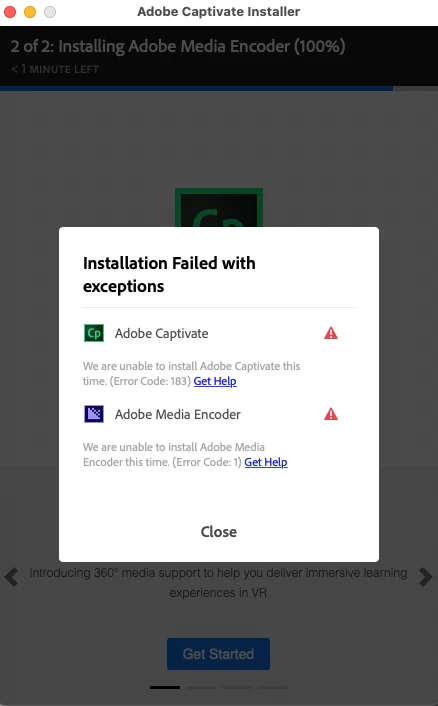
 I clicked on the Get Help link and followed the instructions but still nothing. I searched in Adobe Community and found out about the Creative Cloud Cleaner and followed those instructions but it didn't change anything. Please help.

This topic has been closed for replies.

1 reply

kglad
Community Expert
Community Expert
March 24, 2021

unfortunately, error code 183 isn't helpful and error code 1 indicates a connection with adobe server error.


first make sure your computer meets specs (in part, you have a 64 bit os), Captivate User Guide (adobe.com)


then if you have nothing from adobe cc working on your computer you might be able to clean everything and fix the problem:


uninstall every cc app including preferences, https://helpx.adobe.com/creative-cloud/help/uninstall-remove-app.html
then uninstall the cc desktop app, https://helpx.adobe.com/creative-cloud/help/uninstall-creative-cloud-desktop-app.html
clean your computer of cc files per http://www.adobe.com/support/contact/cscleanertool.html
check for, and if available, update your os
repair all ms visual c++ versions that can be repaired.
update your ms visual c++, if it can be updated
restart your computer (don't skip this)
reinstall the cc desktop app, https://helpx.adobe.com/uk/download-install/kb/creative-cloud-desktop-app-download.html
if you're unable to install the cc desktop app at this stage, use the link at the bottom of the page at https://helpx.adobe.com/uk/download-install/kb/creative-cloud-desktop-app-download.html
use the desktop app to install your cc programs/trials