
Participant
May 19, 2012
Question

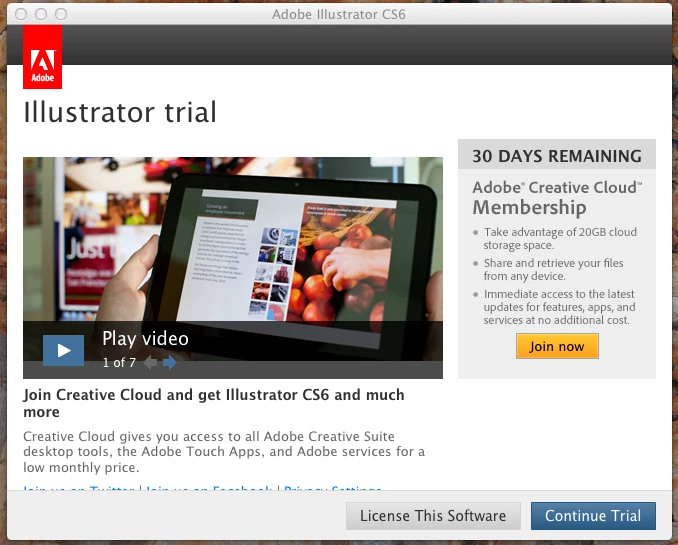
Trial window now pops up on application launch

  • May 19, 2012
  • 6 replies
  • 11664 views

I have been using Creative cloud since it was launched without any problems.  All of a sudden late today, each time I launch an application, a pop up widow comes up telling me I have 30 days remaining on my trial and whether to continue the trial, licence the software of join Creative Cloud - in other words - the usual trial software popup.

I only had the trial version of Photoshop installed originally and Creative Cloud recognised this and ensured that I uninstalled it before installing the Creative Cloud apps.

At this stage, it appears that if I close the Trial pop up window (aka Adobe Application Manager), I can then use my software without any problem.  Rather annoying to have the pop up window each time I launch the software though.

Has anyone else had this issue?
This topic has been closed for replies.

6 replies

Participant
October 19, 2012

Had this exact same issue. I fixed it.

I hope. First and foremost, check your account and that you did in fact purchase the Creative Cloud subscription. I thought I had the whole time and have been getting the same exact issues as everyone else.

Launch: Audition... trial, sign in, serial number....etc.

Checked my bank account, no purchase was made for the Creative Cloud.... ooops.... I could have sworn I already did that.

Now Creative Cloud shows up in my subscriptions when looking at "My Account".

Hopefully this helps some of you peeps.

Participant
December 28, 2012

I reinstalled Adobe Application Manager, which seems to have done the trick. But yes, Adobe had no idea what I was talking about.

HelenWLee
Inspiring
May 29, 2012

I clicked "license this software" and logged in with my ID and after that OK.

Participating Frequently
May 27, 2012
Participant
August 13, 2012

This totally worked for me - I now set the AAM to international english and am finally free of the trial-screen! Such an easy solution, and SO hard to find the answer!

Participating Frequently
May 24, 2012

I have the same problem. So am I paying for a Trial version? I'm very disappointed with Adobe.

I'm using Mac OS X 10.7.4.

David__B
Adobe Employee
Adobe Employee
May 23, 2012

I'm moving this thread over to our download/installation forum.

For general Creative Cloud Membership questions, here is the FAQ link:

http://www.adobe.com/products/creativecloud/faq.html

-Dave

Participant
May 19, 2012

Yes, I have had this exact same situation. I have Fireworks, Dreamweaver, and Photoshop CS6 installed on my desktop since the program launched. I am encountering this same problem with Fireworks and Dreamweaver, though not every single time I open the apps.

Participant
May 28, 2012

I seem to have found the cause of the problem (though no thanks to Adobe Support who had no idea whatsoever).

It would seem that although I pre-purchased my Creative Cloud subscription, Adobe had not updated my subscription status on my account profile at the time Creative Cloud was launched with the result that the Adobe Download Manager became confused and thought the applications were trial versions, hence the pop-up windows, even though I could close the pop up windows and continue usingthe application.

The solution is to ensure that your account profile has the Creative Cloud subscription listed, then uninstall all of the affected applications.  Then simply log back into Creative Cloud and re-download them.  The pop up windows should no longer appear.