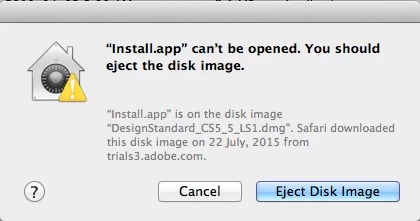
Trying to install CS5.5 Design Standard…but... "install.app"can't be opened
I am so frustrated…I have been spending hours and days on trying to install CS5.5 Design Standard on my mac (Lion).
I began with Chat help, then, since they couldn't figure it out, they sent me to the forum, as well as promising that a "senior advisor" would contact me within 48 hours (that was 5 days ago). Every time I get advice from Adobe staff they direct me to the download page and tell me to download CS5.5 (I have now done this 4 times!!!) The download is not the issue….it's the next step…installation!
Does anyone have any ideas?…please!!
I have tried the adobe cleaner tool
I have tried disabling the "gatekeeper"
NOTE: The very first time I downloaded it, it did install….BUT!...it installed CS5.1 Design Standard and only In-design CS5.5 (photoshop and illustrator 5.5 were missing)…so they told me to uninstall and download again….which I did, and that is when I got the message below.
Perhaps it has something to do with the last part of the sentence… downloaded disk image from trials3.adobe.com….does that mean anything?
Please help!!!
 AdChoices