


Trying to Install CS6 Web Design Premium (Photoshop) on Mojave - "Installer Failed" eror
Hello
This is deja vu all over again, because I swear I hd this problem 3 years ago but I failed to record how I solved it so here I go again...
I have 10.14.6 Os X Mojave and I'm trying to install CS6 Web Design Premier, so I can reinstall Photoshop CS6 on this machine.
I successfully downloaded the dmg file, opened the installer, and when I run the installer I immediately got a pop up error as follows:
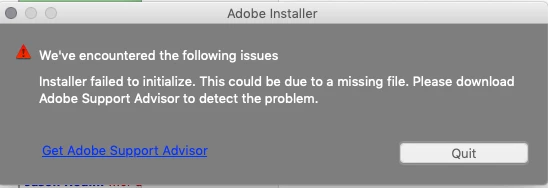
I then went down a rabbit hole of trying to find solutions in this forum, including:
- installing from the terminal (new more verbose errors! see below)
- restarting is safe mode and installing from the terminal (same error as in screenshot above)
- installing aobe air help and then using the installer (same error)
- following someone's random code to undo "apple quarantine":
- sudo xattr -r -d com.apple.quarantine
- ...and then installing from terminal (same more verbose errors! see below)
So I'm at a loss.
Can anyone please help me try to solve this? I use photosop a lot and I would really like to get it running again.
The verbose error messages in terminal are copied below the fold.
Thanks for any assistance!!
bugjah
=====
(base) bugjahs-MacBook-Air-2:~ bugjah$ /Volumes/CS6\ DesWebPrm/Adobe\ CS6\ Design\ and\ Web\ Premium/Install.app/Contents/MacOS/Install
/BuildRoot/Library/Caches/com.apple.xbs/Sources/AppleFSCompression/AppleFSCompression-96.200.3/Common/ChunkCompression.cpp:49: Error: unsupported compressor 8
/BuildRoot/Library/Caches/com.apple.xbs/Sources/AppleFSCompression/AppleFSCompression-96.200.3/Libraries/CompressData/CompressData.c:353: Error: Unknown compression scheme encountered for file '/System/Library/CoreServices/CoreTypes.bundle/Contents/Resources/Exceptions.plist'
/BuildRoot/Library/Caches/com.apple.xbs/Sources/AppleFSCompression/AppleFSCompression-96.200.3/Common/ChunkCompression.cpp:49: Error: unsupported compressor 8
/BuildRoot/Library/Caches/com.apple.xbs/Sources/AppleFSCompression/AppleFSCompression-96.200.3/Libraries/CompressData/CompressData.c:353: Error: Unknown compression scheme encountered for file '/System/Library/CoreServices/CoreTypes.bundle/Contents/Library/AppExceptions.bundle/Exceptions.plist'
 AdChoices