

p2molvaer
Inspiring
October 27, 2020
Answered

Trying to update extension

  • October 27, 2020
  • 5 replies
  • 1480 views

I have bought this extension: https://exchange.adobe.com/creativecloud.details.16183.html

And I have used it for some months, but lately it's not possible to update it (eternal spinning wheel) or uninstall it (error -11). Any suggestions to how I can remove it and reinstall it? I tried the manual install as suggested by the developer, but it didn't seem to work..
This topic has been closed for replies.
Correct answer p2molvaer

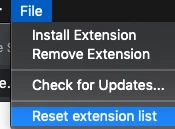
So I managed to solve the problem myself after updating to the recently released Adobe PS v.22.01. I closed CreativeCloud Desktop, deleted the files in Library/Applications Support/Adobe/CEP and launched Anastasiys Extension Manager, then selected File-> Reset Extension List as shown below. It then let me install the .zxp extension package I downloaded from the developer.


5 replies

p2molvaer
p2molvaerAuthorCorrect answer
Inspiring
November 19, 2020

So I managed to solve the problem myself after updating to the recently released Adobe PS v.22.01. I closed CreativeCloud Desktop, deleted the files in Library/Applications Support/Adobe/CEP and launched Anastasiys Extension Manager, then selected File-> Reset Extension List as shown below. It then let me install the .zxp extension package I downloaded from the developer.


Community Expert
November 4, 2020

The locations I mentioned are the ones that I know of, and I have also been installing extension I develop at the same locations. I suppose the documentation also mentions the same. Did you contact the extension developer for support and see if he has any information to add.

-Manan

-Manan
p2molvaer
p2molvaerAuthor
Inspiring
November 4, 2020

Yes. They suggested the same:


Don't use standard Adobe Extension Manager for installation.
Please use the installation methods which you can find in the installation guide.

Best Regards,
Pro Add-Ons.


So, since the program isn't working, can I request a refund? I am not paying for something that doesn't work.

p2molvaer
p2molvaerAuthor
Inspiring
November 4, 2020

Still no further suggestions?


Community Expert
October 27, 2020

Look into these locations on your MAC.

/Users/<account_name>/Library/Application Support/Adobe/CEP/extensions
/Library/Application Support/Adobe/CEP/extensions

One of these locations should have the folder containing this extension(the name should help you identify the folder), remove that folder from this location. This should uninstall the extension(verify it). If it does uninstall, then try the installation again. If this does not work, then put the folder back and contact the extension developer for support.

-Manan

-Manan
p2molvaer
p2molvaerAuthor
Inspiring
October 27, 2020

Tried that, didn't work either. Still get the message I have it installed already. So where does Adobe store their plugins? I should be able to delete it from that folder yes? Because I followed the manual installation from the developer, and there wasn't any CEP folder until I made it earlier today. 

Community Expert
October 27, 2020

Did you manage to download the zxp of the extension as mentioned in the following link

https://exchange.adobe.com/creativecloud/install-instructions.16183.html

If yes then what error did you get when trying to install? Did you try any other installation program apart from Anastasiy’s Extension Manager? One such utility is ZXPInstaller 

-Manan

-Manan
p2molvaer
p2molvaerAuthor
Inspiring
October 27, 2020

I tried that, but I get a message: "There is already an extension installed etc". But I can't uninstall it! So I can't update it either. And the panel is not visible in my PS.

p2molvaer
p2molvaerAuthor
Inspiring
October 27, 2020

Also, now my Adobe CC Desktop service is acting all weird, after I used the Anastasiy’s Extension Manager. Why do I have to install 3rd party Extension installers when I pay for Adobe!? Doesn't make sense to me, your software isn't exactly cheap either! Attached two more screenshots.