


Inspiring
April 11, 2021
Answered

Unable to install CC Desktop on new Win10 x64 laptop

  • April 11, 2021
  • 5 replies
  • 1363 views

Have tried many times to install CC to my new laptop. Initial attempts advised a runtime was missing. Uninstalled CC (yes, the whole laborious process). Re-installed CC, previous message gone and finishes install but will not run. Uninstalled several times (yes, whole laborious process) and re-installed several times, still no joy. I have even manually gone through and removed all of the left over things that the uninstaller and cleaner (and other instructions I could find) left behind. Still no joy.

This is a screen shot of the error:
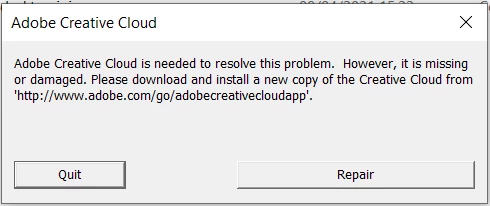
As you can see not very informative and only advises doing what I have done so many times before.

Can anyone offer any advice bearing in mind I have been through the published steps in this forum with no joy.

Thanks in advance

Paul

This topic has been closed for replies.
Correct answer pauljl

OK, rather weirdly I got through to chat on my phone after logging into my account after which the chat session popped up on both my other devices!

Update on the issue after remote technical support is that it was not resolved and I am now awaiting investigations by the 'back end' team. Will post back when I get further information.

Thanks for everyones help so far.


So, my issue is resolved and I wish I could share what the problem was but after an extensive remote session yesterday that failed to resolve the issue, I have recieved an email from Adobe today advising me that the problem has been resolved at Adobe.

So there was nothing wrong with my installation but something at Adobe was preventing CC Desktop from opening (presenting an error indicating a problem with the installation).

I have just successfully opened CC Desktop and I am proceeding with installation of my apps.

The only problem I now face is checking to see whether the unneccessary removal of components from my computer yesterday will have any adverse effect on other functions/features.

5 replies

Participant
September 11, 2021

Unable to install CC Desktop on new Win10 x64 laptop . This is a clean install with no previous software or CC programs. Having the same problem on a newly purchased PC running Windows 10 x64.

For: @medCPucommunity

Peru Bob
Community Expert
Community Expert
April 13, 2021
quote

My laptop is new out of the box, nothing else installed, as it arrived


By @pauljl

Run Windows Update.

pauljlAuthor
Inspiring
April 13, 2021

Thanks, Yep, that happened automatically and the laptop is reporting being up-to-date. I've checked the Dell shipped drivers and all are up-to-date.

Peru Bob
Community Expert
Community Expert
April 13, 2021

You need to be signed into your Adobe account to use chat.

pauljlAuthor
Inspiring
April 13, 2021

Thanks, I was signed in on my tablet and laptop, maybe not on the phone or iPad, will try that.

Jeffrey_A_Wright
Community Manager
Community Manager
April 13, 2021

Paulljl, you may also want to try a different network. If none of the devices can get through, then the blockage could be upstream.  


It is also very likely that the inability to contact us is related to the Creative Cloud desktop app files becoming damaged or unusable.

pauljlAuthor
Inspiring
April 12, 2021

Thanks Peru Bob but as per my original post I have tried all of this several times, The cleaner tool is not very good at cleaning and leaves quite a few orphaned folders and files. I have tried to manually remove all of the orphaned stuff I can find but it doesn't change the behaviour.

Is there a list somewhere of all of the installation prerequisites and dependencies etc? That might help me locate the problem.

Jeffrey_A_Wright
Community Manager
Community Manager
April 12, 2021

Paulkl, please follow solution three of https://helpx.adobe.com/creative-cloud/kb/creative-cloud-missing-damaged.html to manually remove the critical components of the Creative Cloud desktop app. This includes location and renaming the correct OOBE folder in addition to running the CC Cleaner Tool.  Skipping the renaming process often leads to individuals being unable to resolve this error.

John T Smith
Community Expert
Community Expert
April 11, 2021

Your original DLL problem is a Microsoft problem, so you need a Microsoft solution
Go to the Search bar at the top of http://www.microsoft.com/en-us/ to find and re-install the C runtime, or for ALL Windows help
-or direct to https://support.microsoft.com/en-us/help/2977003/the-latest-supported-visual-c-downloads
https://helpx.adobe.com/x-productkb/global/troubleshoot-c-runtime-errors-products.html


Try the Microsoft solution and then do a fresh install

pauljlAuthor
Inspiring
April 11, 2021

Yes, I know. I installed the missing runtime after the first failure. All of the other failures occured after the missing runtime was installed. I now have no useful message at all about why CC Desktop will not open. I know from previous experience that Adobe are always looking to blame someone else for their problems but Adobe should at the very minimum give a reason code for failure, 'your app doesn't work, please re-install' is just not acceptable.