


davemaluyo
Participant
July 9, 2021
Question

Unable to Install Creative Cloud on new M1 MacBook Air

  • July 9, 2021
  • 3 replies
  • 2332 views

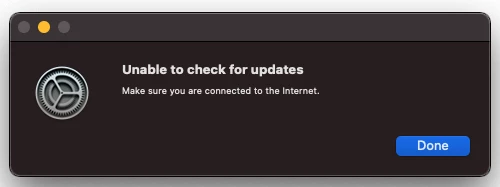
I'm unable to install Creative Cloud on my new M1 Macbook Air. This is the first time installing on this computer, it says: "Unable to check for updates, make sure you are connected to the internet"


I am already connected to my network, and have tried restarting my laptop.
 

This topic has been closed for replies.

3 replies

Participant
January 29, 2022

Does anyone solved this problem? I'm facing this problem too, but I can't find any solution for this issue. I'm using MacbookPro14 2021 

Legend
January 29, 2022

This wasn't a problem with Adobe software at all. The screen shot showed the Mac's own update failing. What do you see?

Jeffrey_A_Wright
Community Manager
Community Manager
July 12, 2021

Dave, please see https://helpx.adobe.com/creative-cloud/help/update-app.html for information on how to manage the update process. The screenshot you posted appears to be from performing a check for updates by the operating system.

Peru Bob
Community Expert
Community Expert
July 9, 2021