


Participant
June 21, 2024
Answered

Unable to install photoshop

  • June 21, 2024
  • 1 reply
  • 5274 views

It says "Sorry, Photoshop won't run on your OS. To continue you'll have to upgrade."

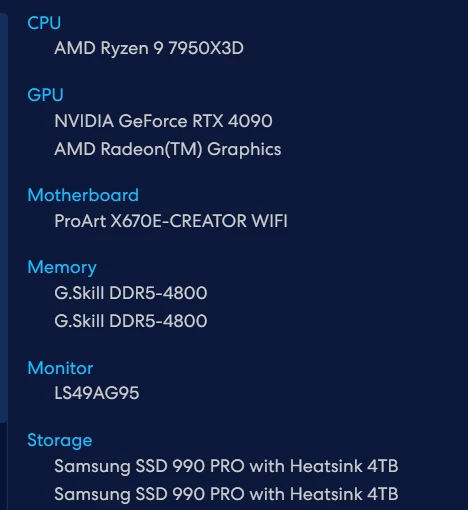
I am almost certain that this is not a hardware issue as I have recently just built this PC, which seems to pass all the system requirements. Additionally, I have updated my windows OS to windows 11 23H2 x64. I am not sure why It is claiming that it cannot run. Here are my hardware specs: 


Correct answer Henry343178953g6g

Update: i have now managed to install photoshop on microsoft edge. I previously used Opera GX. I suspect that my browser may have been the reason for the installation failing.

1 reply

Jeffrey_A_Wright
Community Manager
Community Manager
June 21, 2024

Henry, sorry you are unable to install Photoshop on your new computer running Windows 11. The system requirement block is typically unless compatibility mode has been turned on. Does the computer meet or exceed all of the listed requirements in https://adobe.ly/4c8dWAQ?


If so, what type of Windows 11 is installed on the computer? Is it a limited version of Windows or managed by an organization?


If the system check is not accurate, then it is typically due to the program being run in compatibility mode, Henry. Microsoft published more information on how to configure Compatibility mode for Windows 11 at https://adobe.ly/3xtYYGk. ^JW

Peru Bob
Community Expert
Community Expert
June 21, 2024

@Jeffrey_A_Wright 

 https://adobe.ly/3xtYYGk gives a 404 error.