

karenb98066155
Participant
March 14, 2022
Question

Unable to install Photoshop on MacBook Pro

  • March 14, 2022
  • 6 replies
  • 470 views

Trying to install Photoshop on my Mac with MacOS Big Sur 11.6.4


I keep getting this error even after rebooting:
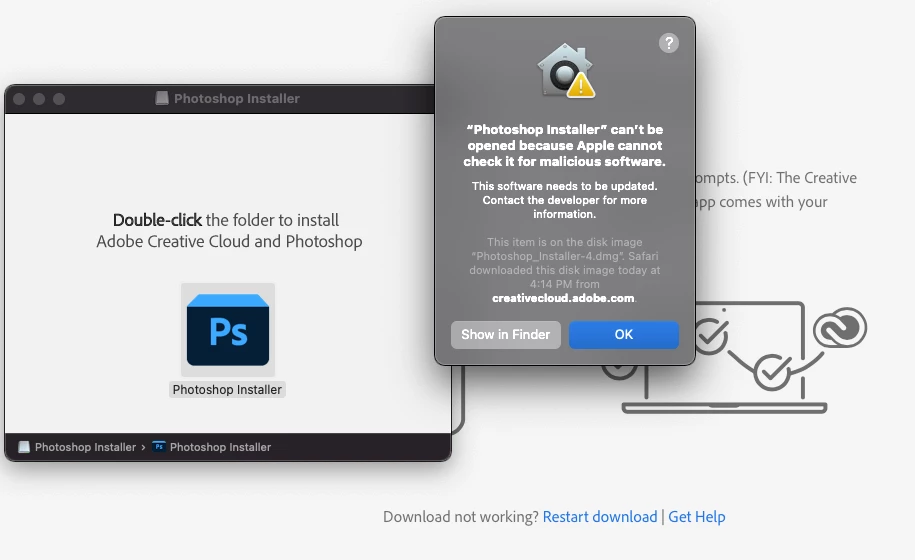
 

This topic has been closed for replies.

6 replies

jane-e
Community Expert
Community Expert
March 14, 2022

Yes, that is what I also described to you that I did in the first place. I am a software developer so I understand how all of this works. I also tried downloading the Creative Cloud app and it will not install either:

By @karenb98066155


Hi Karen,


If you checked the system requirements (you didn't say), then contact Adobe Customer Care, as they can look at your computer.
https://community.adobe.com/t5/creative-cloud-services/how-to-contact-adobe-support/td-p/11875703 . Type "agent".


You can also send a tweet to @AdobeCare.


Jane

Forum volunteer


karenb98066155
Participant
March 14, 2022

Yes, that is what I also described to you that I did in the first place. I am a software developer so I understand how all of this works.

I also tried downloading the Creative Cloud app and it will not install either:

jane-e
Community Expert
Community Expert
March 14, 2022

"Apologies Jane. I logged in to Adobe cloud in my  Safari browser and clicked the download. button at the top. The dmg downloaded but when I open the dmg and double click, I get this error message."

By @karenb98066155


Did you go to: https://creativecloud.adobe.com/apps/all/desktop/pdp/photoshop and log in to your paid CC account first (as per the earlier link)? It should look like this:


Does your computer meet the system requirements?

https://helpx.adobe.com/photoshop/system-requirements.html


Jane


Legend
March 14, 2022

Strange, it looks like it's an older version of PS. Maybe try downloading the Creative Cloud app first. 

karenb98066155
Participant
March 14, 2022

Apologies Jane. I logged in to Adobe cloud in my  Safari browser and clicked the download. button at the top. The dmg downloaded but when I open the dmg and double click, I get this error message.


jane-e
Community Expert
Community Expert
March 14, 2022

@karenb98066155 


You didn't say how you started and how you got to this point.


Please follow these steps in order to download and install Photoshop as part of your Creative Cloud membership:

https://helpx.adobe.com/creative-cloud/help/download-install-Photoshop.html


Jane
