Participating Frequently
May 28, 2020
Question

unable to install Photoshop on macOS 10.15 Catalina

  • May 28, 2020
  • 3 replies
  • 1177 views

Hi guys! I tried to install Photoshop 2020 and this is what it shows
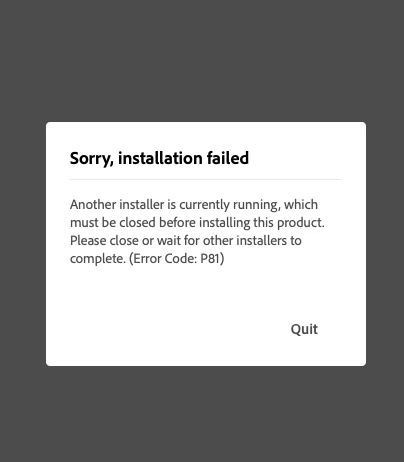
I've searched on youtube how to fix this by right click on the folder>Show package contents>contents>MacOS>install this method doesn't work either. Please help me figure this out ASAP! Thank you so much 🙂


This topic has been closed for replies.

3 replies

Kanikas
Legend
June 8, 2020

Hi there, 

Please refer the link below for help:

https://helpx.adobe.com/in/acrobat/kb/install-error-p81.html


Feel free to update for any additional questions. 


Thanks 

Kanika 

Siri_Author
Participating Frequently
June 17, 2020

I've visited the link you posted but still it doesn't work


Legend
June 17, 2020

Did you rename the PDApp folder?

Legend
June 1, 2020

1. Did you try a reboot?

2. Are you running the installer downloaded by the Creative Cloud Desktop app?

Siri_Author
Participating Frequently
June 2, 2020

1. I did

2. I could not install Creative Cloud Desktop app too.

Participant
June 2, 2020

had your issue resolved?

Are you a Photoshop Pro?
Akash Sharma
Legend
June 1, 2020

Moved to Get-Started

Siri_Author
Participating Frequently
June 2, 2020

Could you please elaborate? 

Thank you.