
tobyfung13460274
Participant
September 22, 2016
Answered

Unable to reinstall Adobe CS6 Design and Web Premium on Mac with MacOS 10.12 Sierra

  • September 22, 2016
  • 1 reply
  • 5076 views

Hey there!

I have my Adobe CS6 Design and Web Premium dmg file but it seems failed to start installation.

Mac Using: MacBook Air 13" (2013)

RAM: 4GB RAM

Storage: 54GB available in Hard Disk

Current OS Version: MacOS 10.12 Sierra

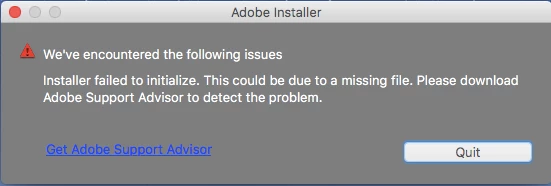
The Installer App kept showing the following error message. I have tried to re-download the dmg file from Adobe.com using different browsers (Safari 10, Firefox 49.0 and Chrome 53.0.2785.116), install Adobe CC Cleaner and restart.

Does anyone have any ideas or solutions about that? Adobe CS6 does not support latest MacOS version?
    This topic has been closed for replies.
    Correct answer Jeffrey_A_Wright

    Thank you for the confirmation Tobyfung.  Please utilize the following steps to install Creative Suite 6 Design and Web Premium:

    1. Mount the Disk Image file for the Creative Suite 6 application
    2. Open the mounted DMG file
    3. Right click on Install.app and select Open Package Contents from the contextual menu
    4. Navigate to Contents/MacOS
    5. Double click on the Unix executable titled “Install”

    A terminal window will open and the installer will initialize.  You will then be given the option to install in trial mode, utilize a serial number, or verify a Creative Cloud membership.

    These steps should work for anyone trying to install Creative Suite 6 under macOS Sierra/10.12.

    Tobyfung if you can please update this discussion with your results it would be appreciated.

    1 reply

    Jeffrey_A_Wright
    Legend
    September 22, 2016

    Tobyfung where did you obtain the installation files for Creative Suite 6 Design and Web Premium?  Did you download the retail installers from Download Adobe Creative Suite 6 applications ​?

    tobyfung13460274
    Participant
    September 23, 2016

    Yeah! I got it from the same website you provided.

    Jeffrey_A_Wright
    Jeffrey_A_WrightCorrect answer
    Legend
    September 23, 2016

    Thank you for the confirmation Tobyfung.  Please utilize the following steps to install Creative Suite 6 Design and Web Premium:

    1. Mount the Disk Image file for the Creative Suite 6 application
    2. Open the mounted DMG file
    3. Right click on Install.app and select Open Package Contents from the contextual menu
    4. Navigate to Contents/MacOS
    5. Double click on the Unix executable titled “Install”

    A terminal window will open and the installer will initialize.  You will then be given the option to install in trial mode, utilize a serial number, or verify a Creative Cloud membership.

    These steps should work for anyone trying to install Creative Suite 6 under macOS Sierra/10.12.

    Tobyfung if you can please update this discussion with your results it would be appreciated.