


Participant
August 31, 2025
Answered

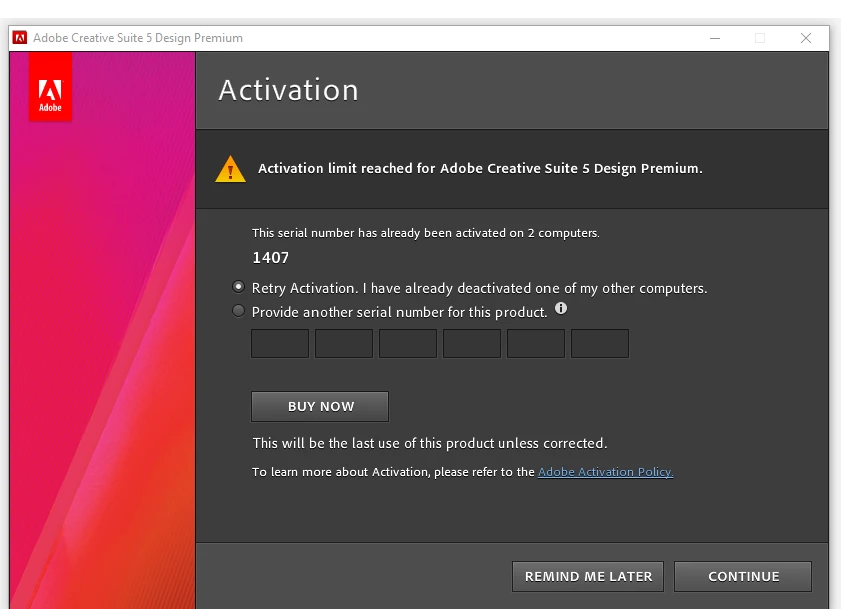
Unable to use CS5 due to incorrect Activation limit exceeded message.

  • August 31, 2025
  • 2 replies
  • 194 views

I bought and activated a CS5 education license around 2011. I only own 2 computers: a desktop and a laptop. Those are the only computers on which I have currently installed CS5. Since 2011, my laptop has changed twice, and my desktop has remained the same. The 2 older laptops that I owned in the past no longer exist.


This past week, I received this activation-related message on my desktop. I did not receive any such message on my laptop. The same license is installed on both systems.


I don't know why this is suddenly happening. Adobe's help AI is not able to resolve my problem. Is there a human somewhere out there who can help me resolve this?


Thanks.
Correct answer kglad

you'll need to deactivate cs5 on a computer that has an activation to overcome that issue.


https://community.adobe.com/t5/download-install-discussions/activation-limit-reached-for-non-subscription-adobe-desktop-applications/td-p/14804413?linkId=100000305463075

2 replies

Nancy OShea
Community Expert
Community Expert
September 1, 2025

I assume you no longer qualify for the Student version, given the advanced age of your license.  And CS5 is 15-year-old, unsupported software. So Adobe can't help you.  It might work, it might not. That's the risk you take with older products.


If you can't deactivate from an older machine due to loss or failure, you'll need to replace CS5 with a supported product.


CS5 REPLACEMENTS:
==============
FREE Acrobat Reader -- view, comment, print & sign PDF.
https://www.adobe.com/acrobat/pdf-reader.html

Paid Acrobat Pro -- the complete solution for creating and saving PDF.
https://www.adobe.com/acrobat/acrobat-pro.html

Photoshop Elements or Premiere Elements (3 year license, no subscription needed).
https://www.adobe.com/products/photoshop-elements.html

Creative Cloud Photography Plan
https://www.adobe.com/creativecloud/photography.html

Creative Cloud Bundles & Single Apps for mobile, web & desktops
https://www.adobe.com/creativecloud/plans.html

Most Adobe apps work on these systems, no more than 2 versions back:

  • Windows 11 (64-bit) versions 24H2, 23H2; Windows 10 versions 22H2, 21H2;
  • MacOS 15 (Sequoia), 14.7 (Sonoma), 13.6.7 (Ventura).

- https://helpx.adobe.com/creative-cloud/system-requirements.html
- https://helpx.adobe.com/photoshop/system-requirements.html
- https://helpx.adobe.com/photoshop/kb/photoshop-cc-gpu-card-faq.html

NOTE: MS is ending support for Win10 in October. Apple is releasing Tahoe later this year. 

Hope that helps.


Nancy O'Shea— Product User & Community Expert
Participant
August 31, 2025

I have the original CDs for this version.

kglad
Community Expert
kgladCommunity ExpertCorrect answer
Community Expert
August 31, 2025
