Inspiring
November 5, 2016
Answered

Uninstall Old Versions?

  • November 5, 2016
  • 1 reply
  • 11465 views

I recently upgraded my Creative Cloud apps to the 2017 version. Today, I noticed that many of my previously installed Creative Cloud apps are still in my Applications folder (i.e. Illustrator 2015, Illustrator 2015.3, InDesign 2015, Photoshop 2015, Photoshop 2015.5, etc.) I opened the Creative Cloud Manager, but none of the apps I mentioned appear–only the 2017 versions. How do I get rid of these old apps?

This topic has been closed for replies.
Correct answer kglad

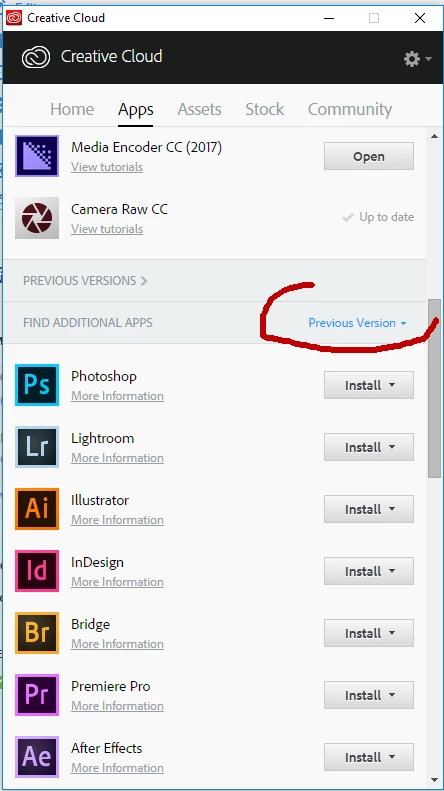
did you check 'previous versions' in the cc desktop app?

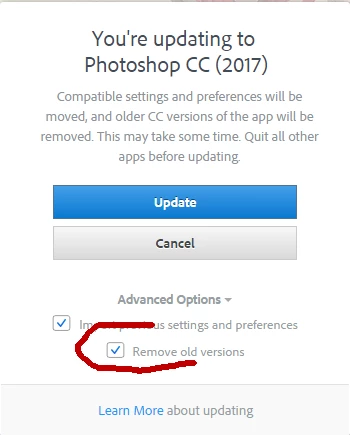
in the future, you can select advanced options when upgrading and opt to remove old versions.

1 reply

kglad
Community Expert
kgladCommunity ExpertCorrect answer
Community Expert
November 5, 2016

did you check 'previous versions' in the cc desktop app?

in the future, you can select advanced options when upgrading and opt to remove old versions.

kcrossleyAuthor
Inspiring
November 5, 2016

I didn't. Thank you.

kglad
Community Expert
Community Expert
November 5, 2016

you're welcome.