andreasw5942258
Inspiring
May 2, 2021
Answered

Uninstall - Reinstall instructions

  • May 2, 2021
  • 1 reply
  • 703 views

Hi everybody,
I have some great problems with LR Classic and Photoshop so I decide to uninstall both applications and reinstall them. I'm using the Photoshop Photography Plan.

Where can I find clear (step by step) instructions how do uninstall and reinstall these programmes?

Thanks in advance for your help

Andreas

This topic has been closed for replies.
Correct answer Rob_Cullen

The Adobe Creative Cloud Desktop App is your 'go to' App to both uninstall and install (and Activate) all Adobe software.

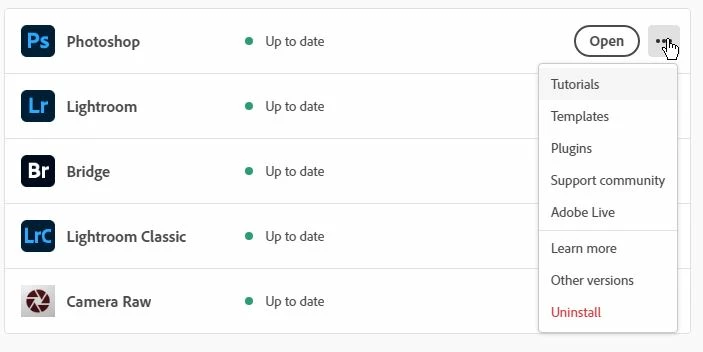
The ...  three dot menu has the uninstall selection, and after an uninstall the button will then show (Install) instead of (Open).


For anyone with "great problems" it can be helpful to also download and run the Adobe Creative Cloud Cleaner Tool-

Cleaner Tool Creative Cloud


1 reply

Rob_Cullen
Community Expert
Rob_CullenCommunity ExpertCorrect answer
Community Expert
May 2, 2021

The Adobe Creative Cloud Desktop App is your 'go to' App to both uninstall and install (and Activate) all Adobe software.

The ...  three dot menu has the uninstall selection, and after an uninstall the button will then show (Install) instead of (Open).


For anyone with "great problems" it can be helpful to also download and run the Adobe Creative Cloud Cleaner Tool-

Cleaner Tool Creative Cloud


Regards. My System: Windows-11, Lightroom-Classic 15.3, Photoshop 27.5, ACR 18.3, Lightroom 9.3, Lr-iOS 10.4.0, Bridge 16.0.3 .
andreasw5942258
Inspiring
May 5, 2021

Hi WobertC

I did not use LR classic and Photoshop for a couple of days. But today I got an update of the Adobe Creative Cloud App (for Windows) and now everything seems to work fine. I'm happy that I did not have to go through the uninstall/reinstall  procedure.


Regards