Participant
December 26, 2021
Answered

unzureichender vram, Grafikprozessor nicht kompatibel

  • December 26, 2021
  • 2 replies
  • 827 views

Hallo, ich habe die neueste Photoshop Version, die auf meinem Mac nicht funkioniert. Wie kommt man zu einer älteren Version zurück? Wie funktioniert ein solcher download?

Heinz

 

This topic has been closed for replies.
Correct answer kglad

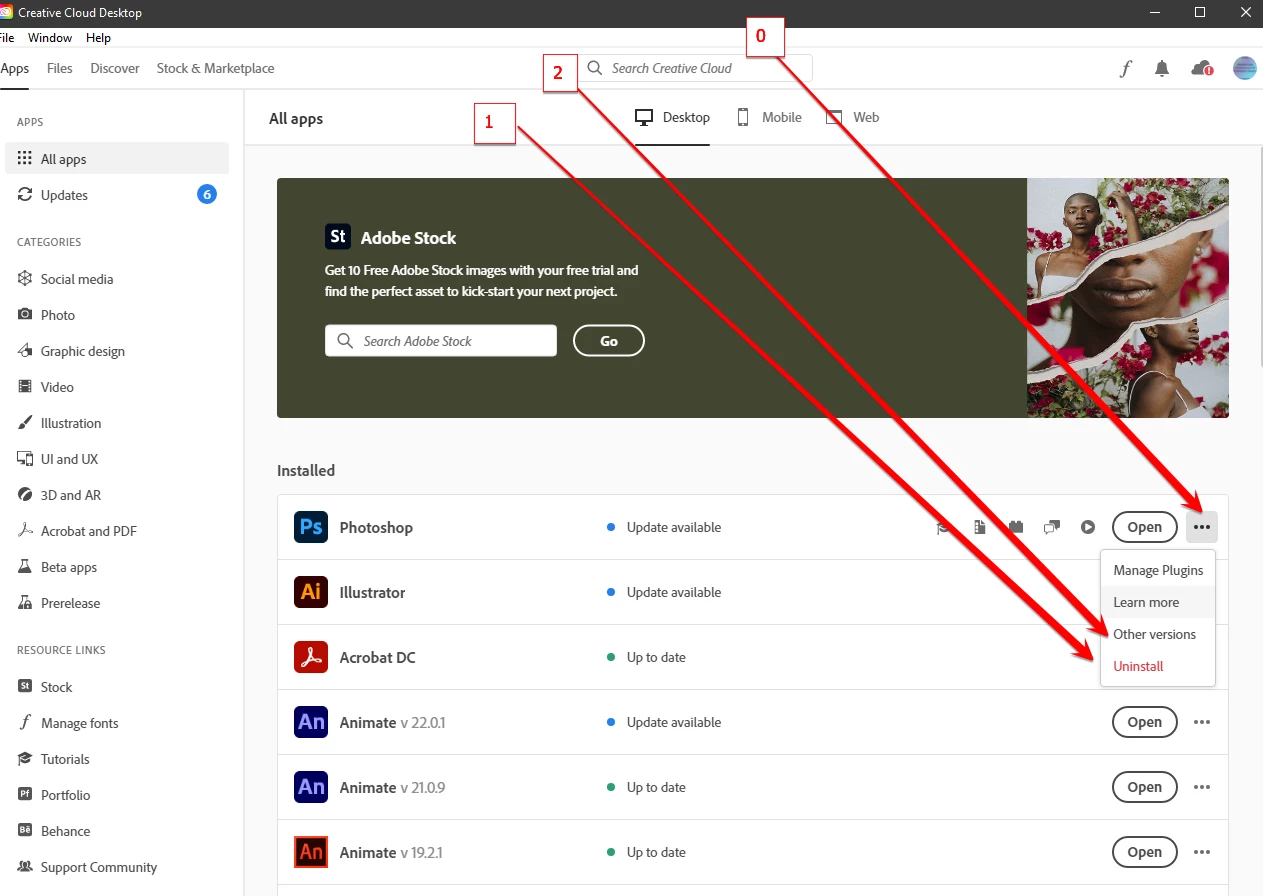
you uninstall the current version using the cc desktop app, and then select other versions:


2 replies

Nancy OShea
Community Expert
Community Expert
December 26, 2021

Which Mac OS do you have?


Creative Cloud maintains only the last 2 major release versions when the box is checked to "Show Older Apps" from Settings in your Creative Cloud Preferences.   See screenshot.


For best results, make sure your computer meets the minimum CPU & GPU requirements. Most Creative Cloud apps work on:

  • Windows 10 versions 21H1, 20H2, 2004, and 1909 (LTSB branches are not supported);
  • macOS 12 (Monterey), macOS 11 (Big Sur), macOS 10.16 or 10.15 (Catalina)

- https://helpx.adobe.com/creative-cloud/system-requirements.html
- https://helpx.adobe.com/photoshop/system-requirements.html
- https://helpx.adobe.com/photoshop/kb/photoshop-cc-gpu-card-faq.html

Nancy O'Shea— Product User & Community Expert
kglad
Community Expert
kgladCommunity ExpertCorrect answer
Community Expert
December 26, 2021

you uninstall the current version using the cc desktop app, and then select other versions: