Update Failure Code U44M2P28: Lightroom 6.1.1 to 6.5 (perpetual license)
I have Lightroom 6.1.1 installed (perpetual license) and want to update to 6.5 (perpetual). I located the update, downloaded it and attempted to install it. But the Adobe Application Manager tells me the installation failed, error code U44M2P28. [I've tried with earlier updates, and have gotten similar results.]
Here are the details. To prepare for the update, I applied Simon Chen's permissions fix (Lightroom 2015.5: Won't start. Ask to change permission of folders, but that doesn't solve. | Photoshop Family Customer …).
I downloaded the 6.5 update and activated the installation. But I got the following failure window:
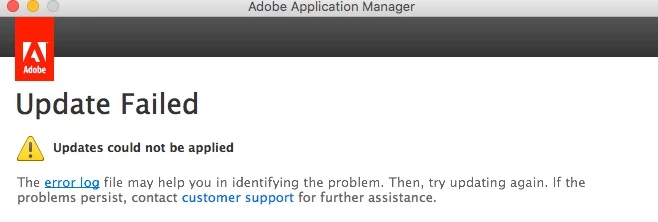
The error log is a single page with this on it:
Lightroom CC/6 Update – March 2016
Update is not applicable. Error Code: U44M2P28
Any help would be appreciated. I'm beginning to think that I won't be able to apply ANY updates.
_______________________________________________________
If I should need to uninstall then reinstall my current version (6.1.1), where can I get a fresh copy to install? If I need to uninstall 6.1.1, how? The Adobe Applications Manager won't open. Can I use any other uninstaller that deletes all application's files?
 AdChoices