Inspiring
September 29, 2014
Question

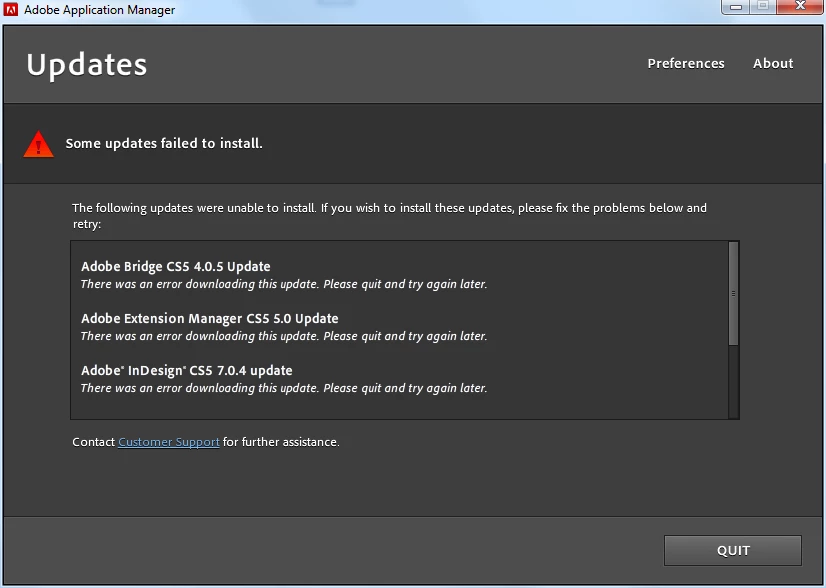
Updating CS5 desktop updates fail. "There was an error downloading this update. Please quit and try again later"

  • September 29, 2014
  • 1 reply
  • 886 views

The Adobe update keeps promptoing me to update my CS5 pproducts. But when I try, I get the message in the subject line. I have been trying this for weeks (months??).

I suspect this may be the wrong forum, but it seems to be the only one I can reach.
This topic has been closed for replies.

1 reply

iAnkitkhurana
Adobe Employee
Adobe Employee
September 29, 2014

Hi Tony,

We would need to see log files, please go to

  • Windows 32 bit (XP, Vista, 7): \Program Files\Common Files\Adobe\Installers\
  • Windows 64 bit (XP, Vista, 7): \Program Files(x86)\Common Files\Adobe\Installers\
  • Mac OS: /Library/Logs/Adobe/Installers/

& attach (click on advanced editor and on the right click on Attach) Adobe extension manager CS5, Adobe Indesign CS5 here.


Also, let me know the system information like which OS are you using?

-Ankit

Inspiring
September 29, 2014

Thanks for the response. The OS is Win7 64-bit, fully updated.

I can't see where to attach a file. All I see is this:

and none of the icons seem to be for attaching files.

Are these the files you will need?:

iAnkitkhurana
Adobe Employee
Adobe Employee
September 29, 2014

Please run the update again and see any file/folder with today's date.