
Participant
November 9, 2017
Answered

updating lightroom

  • November 9, 2017
  • 1 reply
  • 363 views

I have Lightroom 5.2 and whenever I open Lightroom it, I have a notification that updates are available. I click to "download" and then I got routed to a screen that says the updates are not found.

How can I get the latest updates?
    This topic has been closed for replies.
    Correct answer John Waller

    The last update for Lightroom 5 was 5.7.1.

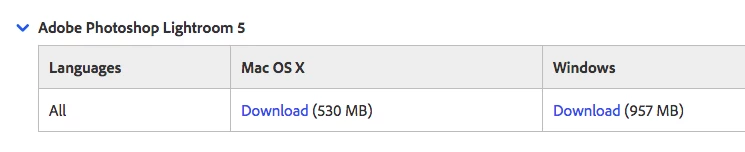
    Try Download Photoshop Lightroom

    Click on Adobe Photoshop Lightroom 5 link to reveal the Lightroom 5.7.1 links

    1 reply

    John Waller
    Community Expert
    John WallerCommunity ExpertCorrect answer
    Community Expert
    November 9, 2017

    The last update for Lightroom 5 was 5.7.1.

    Try Download Photoshop Lightroom

    Click on Adobe Photoshop Lightroom 5 link to reveal the Lightroom 5.7.1 links

    Participant
    November 9, 2017

    Thank you!

    Do you know if there is a way to upgrade my Lightroom 5 to Lightroom CC? Of course I am sure I would have to pay for the upgrade-I just don't want to lose my presets in LIghtroom 5.  Thanks

    John Waller
    Community Expert
    Community Expert
    November 9, 2017

    There are now two totally different Lightrooms:

    • CC, and
    • Classic CC.

    See: https://www.lightroomqueen.com/lightroom-cc-vs-classic-features/

    Both are subscription only. You cannot buy them or buy an upgrade. No perpetual licenses.

    Both have different feature sets and workflows.

    Lightroom Classic CC is what the perpetual version after perpetual version 6 would have looked like if it was not subscription only. Confused? Me too. Presets should transfer but try a trial version first.

    Buy Adobe Photoshop Lightroom Classic CC | Desktop photography software

    Be careful with the wording: "Buy" means buy a subscription.

    Lightroom CC is a brand new product and workflow with the OLD Lightroom name. Confusing. Handling of presets varies in the new CC.