Participant
November 8, 2018
Answered

Upgrading LR classic download error

I'm running OS X el-Capitan 10.11.6, and have to this point had no difficulty with updates.

The current update failed with message 190:

Exit Code: 190

-------------------------------------- Summary --------------------------------------

- 2 fatal error(s), 0 error(s), 0 warnings(s)

FATAL: Sanity check for installation failed. Current OS version 10.11.6 doesn't satisfy OS requirements.

FATAL: Error occurred in install product workflow with error code 190 error message

-------------------------------------------------------------------------------------

I can't get anywhere.Ideas?

This topic is closed to new replies. Start a new post to keep the conversation going.
Nancy OShea
Nancy OSheaCorrect answer
Community Expert
November 8, 2018

In the future, please check the new system requirements before you attempt an upgrade.

Upcoming Changes to Creative Cloud OS Support for Windows and Mac | Adobe Blog

Lightroom Classic CC system requirements

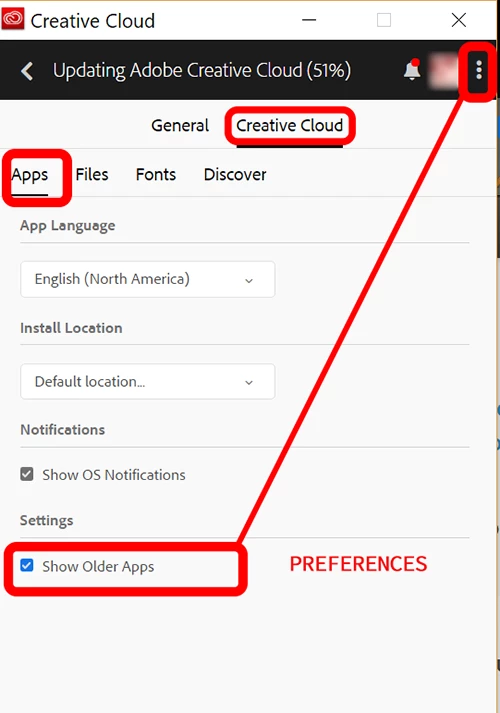
You can of course rever to an older verrsion that is compatible with your OS from your CC Desktop App.  See screenshot.

Nancy O'Shea— Product User & Community Expert

2 replies

Nancy OShea
Community Expert
Nancy OSheaCommunity ExpertCorrect answer
Community Expert
November 8, 2018

In the future, please check the new system requirements before you attempt an upgrade.

Upcoming Changes to Creative Cloud OS Support for Windows and Mac | Adobe Blog

Lightroom Classic CC system requirements

You can of course rever to an older verrsion that is compatible with your OS from your CC Desktop App.  See screenshot.

Translate
Nancy O'Shea— Product User & Community Expert
kglad
Community Expert
Community Expert
November 8, 2018

Current OS version 10.11.6 doesn't satisfy OS requirements: you need to update your os.

Translate