
Participant
June 6, 2020
Answered

Using Templates

  • June 6, 2020
  • 2 replies
  • 387 views

I have recently downloaded templates from the stock library thinking tht they were text effects. I have no idea how to edit and use templates but I`m trying to learn rather than give up. Can anyone give any help as when I load the template in I can see where it says `edit text here` on the layers menu but I`m really struggling to actually do anything with it. A couplde of the templayes seem to divide the screen up in to multiple areas!
    This topic has been closed for replies.
    Correct answer Nancy OShea

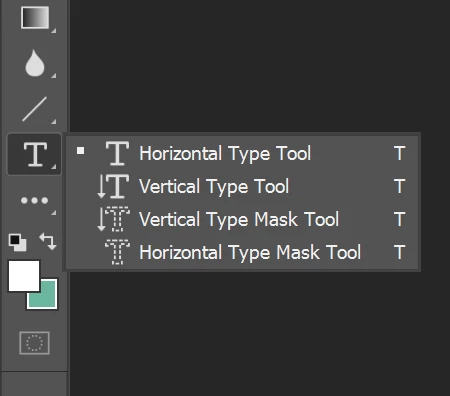
    In Photohsop CC, use the horizontal or vertical Type tool to edit text layer.


    Incidentally, your Template download should have come with instructions on how to use it.  Did you reach out to the Stock contributor you purchased it from?


    2 replies

    Nancy OShea
    Community Expert
    Nancy OSheaCommunity ExpertCorrect answer
    Community Expert
    June 6, 2020

    In Photohsop CC, use the horizontal or vertical Type tool to edit text layer.


    Incidentally, your Template download should have come with instructions on how to use it.  Did you reach out to the Stock contributor you purchased it from?


    Nancy O'Shea— Product User & Community Expert
    John T Smith
    Community Expert
    Community Expert
    June 6, 2020

    Adobe currently has 23 programs included in a full Cloud subscription
    Please post the exact name of the Adobe program you use so a Moderator may move this message to that forum