
rcraighead
Legend
June 2, 2018
Question

Version number when downloading latest versions

  • June 2, 2018
  • 2 replies
  • 1530 views

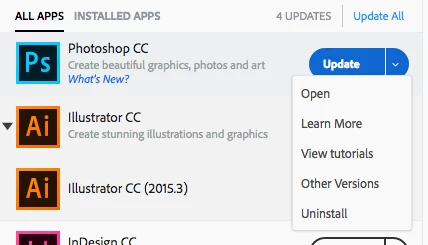
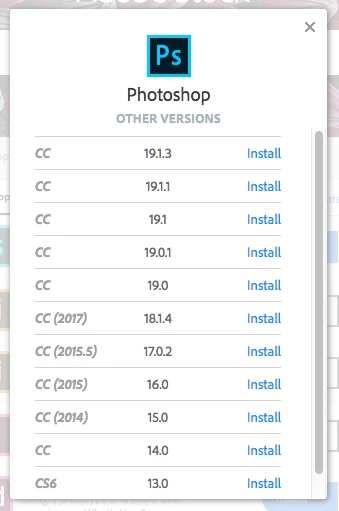
I do not see a "version number" for the latest version of CC software in the "Adobe Creative Cloud" app. I am being told there is a "Photoshop update" but the version number is not listed. When I click to view "Other Versions" the version I have installed (19.1.3) is not even listed. I had to search Google to determine what is the latest version of Photoshop (I think it is 19.1.4). Why can't Adobe just tell me that basic information in their software????
This topic has been closed for replies.

2 replies

rcraighead
Legend
June 2, 2018

The version I have installed is 19.1.2 (forum would not let me update my post).

AxelMatt
Community Expert
Community Expert
June 2, 2018

I don't understand your problem. Why is the version number so important for you?

If your are interested about the changes please click on "What's new".

My System: Intel i7-8700K - 64GB RAM - NVidia Geforce RTX 3060 - Windows 11 Pro 25H2 -- LR-Classic 15 - Photoshop 27 - Nik Collection 8 - PureRAW 6 - Topaz Photo AI
rcraighead
Legend
June 2, 2018

For one thing, I'd like to know if it is a "Bug Fix" or a major upgrade. Of course the version number is important. I shouldn't have to go to a separate website to determine it.