
JonathanMorton
Participant
February 12, 2016
Answered

Where is the [discontinued] Fireworks CS6 application download?

  • February 12, 2016
  • 3 replies
  • 10189 views

The Fireworks CS6 application seems to have been removed from the Creative Cloud desktop app and I can't find a download link on the Adobe site. I know it is a legacy application but I have years of files created with Fireworks I need access to and if my install should become corrupt or I change computer, I'll need the install file. Please can you advise where I can download? Thanks.
This topic has been closed for replies.
Correct answer Nancy OShea

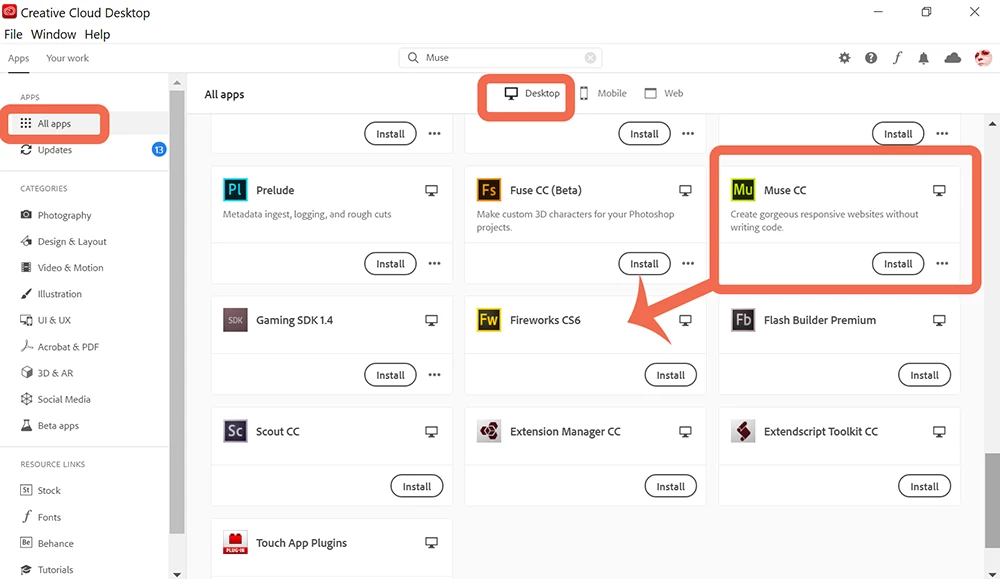
FW appears on the page that shows all apps - but no way to open it! 

In my Preferences, there is no "SHOW OLDER APPS" choice. 


MoniquevanGent,

Since 2012, Fireworks is discontinued.  If you have a Teams/Enterprise account, please contact your IT dept admin for assistance. 


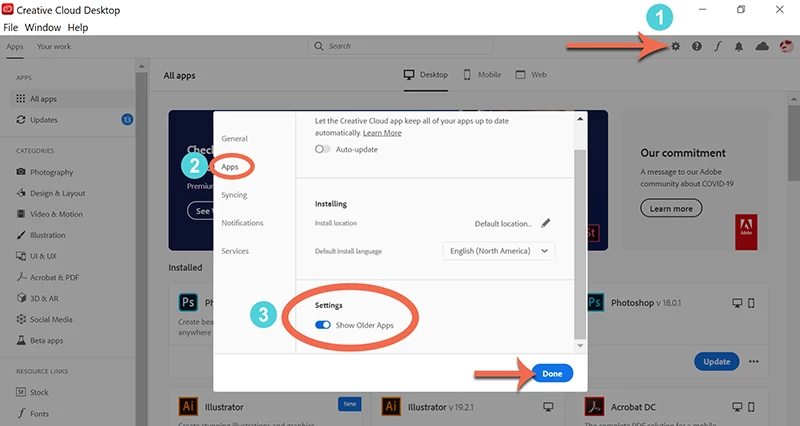
For Individuals with a PAID Creative Cloud All Apps Plan, please open CC Desktop App and

1. Click on Preferences (gear icon). 

2. Go to APPS.

3. Scroll down to Settings and toggle Show Older Apps.  See screenshots.


Post back if you still need help.


3 replies

TimSunLight
Participating Frequently
January 23, 2020

This doesn't help any more. The correct answer is Angie Seegers below from MWW Management - MANY THANKS! Works with the new CC app.

Participant
November 28, 2019

SO EASY- Go to FILE then Go to PREFERENCES then SCROLL DOWN AND TOGGLE to SHOW OLDER APPS and BAM THERE IT IS. It's my favorite too, so I feel your pain.


Angie Seegers
MWW Management


Participant
December 2, 2019

Please - "Go to FILE" - from where?

Just Shoot Me
Legend
December 2, 2019

In the CC desktop app but for CS6 that doesn't apply.

Adobe removed all older apps from the CC DTA and only allows the last one or 2 older apps to be reinstalled.

Atul_Saini
Legend
February 12, 2016
JonathanMorton
Participant
February 12, 2016

Great, thank you!

Atul_Saini
Legend
February 12, 2016

You are welcome.