

Which version upgrade should I install for solution 2 to solve error U44IM1p7?
I am getting an upgrade notice for Photoshop CS6 that results in a failed installation error U44lM1p7. After following recommended fixes, I tried the first then had to resort to the second to download manually from Adobe. Hopefully, a more recent update solves my problem if the date formats match for programs and updates. It would help if they were.
I need to verify whether I have the correct download as follows:
My version from Help in Photoshop CS6 is 13.0.1 (13.0.1.3 2013/10/24.r.34 2013/10/24:21:00:00)64 for my Windows 64 bit PC. This Photoshop was included with Production Premium CS6.
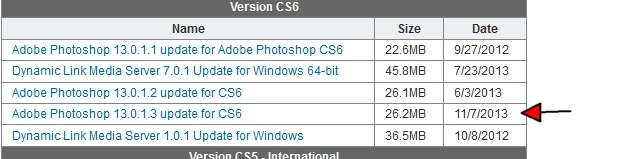
Since the zip file download I chose for solution 2 shows 11/7/2013 26.2 MB for my existing version, and the date format in Photoshop CS6 Help is inconsistent with the download, should I install the download assuming year/month/day format in Help is earlier than 11/7/2013 i.e. month/day/year?



 AdChoices